How to Prevent Overselling: 9 Causes and the Fix for Each
Overselling rarely has one cause. This guide traces nine of them, including sync delays, unreserved orders, bundles, manual edits and returns, and gives you the fix, a worked example and a daily checklist.
On this page
- Key takeaways
- What overselling is, and why it keeps happening
- The 9 causes of overselling: cause, symptom and fix
- 1. Sync delay between channels
- 2. Silent sync failure
- 3. Lost product links and SKU mismatches
- 4. Orders that do not reserve stock
- 5. Bundles and kits that do not deduct components
- 6. Manual edits on the store side
- 7. Returns restocked before inspection
- 8. Phantom stock: breakage, shrinkage and early receipts
- 9. Store settings and offline sales that bypass stock
- Worked example: tracing an oversell back to its causes
- The formula for what to list
- A daily routine to prevent overselling
- Copy-ready overselling prevention checklist
- Common mistakes when trying to stop overselling
- Edge cases generic advice skips
- Cash-on-delivery orders
- Refused COD parcels on their way back
- Variants sharing stock
- Packs versus singles
- Stock held by a marketplace’s own fulfilment
- Several warehouses
- Pre-orders
- How to do this in Cash Flow Inventory
- Watch and repair store sync
- Keep stock from going below zero
- Frequently asked questions
- What is the main cause of overselling?
- How much buffer stock should I hold back on each channel?
- Should unpaid or cash-on-delivery orders reserve stock?
- What should I do when I have already oversold?
- Does blocking negative stock stop overselling?
- How often should stock sync between my stores?
To prevent overselling, keep one source of truth for stock and list only what is genuinely free to sell. That means on-hand stock minus committed orders and a small buffer, and every channel, bundle, return and manual change has to update that source quickly. Most overselling comes from a short list of fixable causes, and each one leaves a recognisable symptom.
This page covers the nine causes we see most often in small and mid-sized online stores. For each one you get how it happens, the symptom that gives it away and the fix.
You also get a worked example with real numbers, a formula for the buffer, a daily routine you can copy, the edge cases generic advice skips, and how to set this up in Cash Flow Inventory.
Key takeaways
- Overselling happens when the number a customer sees is higher than the number you can actually ship. Every cause below widens that gap in a different way.
- List the available quantity, not the on-hand quantity: on hand minus unfulfilled orders minus a buffer sized to your sync delay.
- Silent failures do more damage than slow syncs. A store in maintenance mode or a broken product link can freeze a listing at the wrong number for days.
- Bundles, returns and manual edits on the store side are the three causes most often missed in a stock audit.
- Blocking negative stock in your books does not stop a store taking the order. It does stop the error spreading into your cost of goods and gives you a trail to fix it.
What overselling is, and why it keeps happening
Overselling means accepting an order for stock you do not have. The customer pays, you discover the shelf is empty, and you either cancel, delay or substitute. Each option costs you something: marketplace penalties, refunds, a bad review or a customer who does not come back.
The underlying problem is always the same. Your stock record and your physical shelf have drifted apart, or your channels have drifted from your stock record. If you have already read about the causes of inventory discrepancies, overselling is what those discrepancies look like from the customer’s side.
It is closely related to negative inventory. Negative stock in your books is often the first visible sign that you sold something you never had.
The 9 causes of overselling: cause, symptom and fix
1. Sync delay between channels
Cause: your stores update stock on a schedule or queue, not instantly. Two channels can sell the last unit in the same window. Platforms also throttle how fast they accept updates when you push many at once.
Symptom: oversells cluster at busy times, such as a flash sale, a payday weekend or Ramadan and Black Friday evenings, and usually involve only one or two units.
Fix: hold back a buffer sized to your worst realistic delay (formula below). On fast-moving SKUs, list a lower quantity on the slower channel.
2. Silent sync failure
Cause: the connection stops working without anyone noticing. Common reasons are a security plugin or firewall blocking the API, maintenance mode left on after a theme update, or a revoked API key.
Symptom: one channel keeps showing the same quantity for days while sales continue elsewhere. Oversells then arrive in a batch, not one at a time.
Fix: monitor sync health every day, not just sales. When a store refuses the connection, fix the store-side block first, then resend. Our guide to WooCommerce stock sync across channels covers the WooCommerce-specific blocks in detail.
3. Lost product links and SKU mismatches
Cause: a listing exists on the store but is no longer linked to your inventory item. It might have been created by hand, duplicated, deleted and re-created, or given a slightly different SKU (“MUG-BLU” vs “MUG-BLUE”).
Symptom: stock updates go to one listing while customers buy from another. You may also see two copies of the same product on the store.
Fix: one SKU per sellable item, matched exactly on every channel. Never re-create a product to fix it; re-link the existing one. Our post on preventing duplicate entries in your inventory system covers the naming discipline.
4. Orders that do not reserve stock
Cause: stock usually leaves your books when goods are picked or shipped, not when an order is placed. If you list on-hand stock, every paid but unshipped order is still being offered to new customers. Abandoned carts are the opposite risk: reserving them for hours hides stock that is really free.
Symptom: the system shows stock, but when you go to pick, earlier orders have already claimed it.
Fix: list the available quantity, which is on hand minus unfulfilled orders. Reserve at payment or order confirmation, not at add-to-cart. Release reservations on cancelled and timed-out orders.
5. Bundles and kits that do not deduct components
Cause: a “gift set of 2” is set up as its own product with its own stock figure, so selling it never reduces the single items inside it. The reverse also happens: singles sell out and the bundle still shows stock.
Symptom: singles oversell soon after a run of bundle sales, or bundles oversell after a run of singles.
Fix: build bundles as kits from component SKUs, so that bundle availability is calculated from the scarcest component. A set of 2 with 9 mugs free can show at most 4.
6. Manual edits on the store side
Cause: someone types a stock number straight into the store admin, perhaps “just to get the listing live” or during a promotion. That number now disagrees with your inventory system until the next push overwrites it. Worse, it may never be overwritten if that field is not synced.
Symptom: a channel shows a round number (10, 50, 100) that matches nothing in your records.
Fix: make your inventory system the only place stock is changed. Remove stock-edit rights from store-admin roles that do not need them, and record real changes as inventory adjustments with a reason.
7. Returns restocked before inspection
Cause: a return is booked straight back into sellable stock the moment the parcel is logged, before anyone checks it. Damaged, used or incomplete items go back on sale.
Symptom: you pick an item and find it chipped, opened or missing parts, so the order cannot be shipped.
Fix: receive returns into an inspection step. Only restock what passes; write off or quarantine the rest. See returns management for a full process.
8. Phantom stock: breakage, shrinkage and early receipts
Cause: the record says units exist that do not. Typical reasons are breakage nobody recorded, samples given away, theft, or a purchase receipt booked when the supplier invoiced rather than when goods arrived.
Symptom: oversells on items you “definitely had”, often found during picking or a count.
Fix: book receipts only when goods are physically counted in. Record damage the same day, and cycle-count your top sellers weekly.
9. Store settings and offline sales that bypass stock
Cause: a “continue selling when out of stock” or backorder setting left switched on, often by a theme or import. Offline till sales that only reach the system when the connection returns have the same effect.
Symptom: orders for items at zero stock, with no sync error anywhere.
Fix: audit the out-of-stock behaviour of every product and variant on each platform. Shopify’s help centre and WooCommerce’s documentation explain where these settings live. Keep backorders only on items where you mean to offer them.
Worked example: tracing an oversell back to its causes
Example: a shop selling handmade ceramic mugs (a hypothetical business, “Kiln and Co.”). It sells one blue mug SKU on its WooCommerce store, on Etsy and at a weekend market till. On Friday evening the records show 40 mugs on hand, and both online channels list 40.
| Line | Cause | Units | Running total |
|---|---|---|---|
| Recorded on hand, Friday | Starting figure | 40 | 40 |
| Mugs broken at last market, never adjusted | Phantom stock (8) | −3 | 37 |
| Return restocked without inspection, chipped | Returns (7) | −1 | 36 |
| 4 gift sets of 2 sold, components never deducted | Bundles (5) | −8 | 28 |
| Paid orders not yet picked | Unreserved orders (4) | −6 | 22 |
| Truly free to sell | 22 |
Over the weekend Kiln and Co. sells 15 mugs on WooCommerce, 9 on Etsy and 3 at the market till: 15 + 9 + 3 = 27. With only 22 free, it has oversold 27 − 22 = 5 mugs.
Notice that sync speed was not the main problem here. Even with instant sync, both channels would have shown 40 because the starting number was wrong by 18 (3 + 1 + 8 + 6 = 18). Fixing causes 4, 5, 7 and 8 removes most of the risk. The buffer then covers what is left.
The formula for what to list
Listed quantity = sellable on hand − unfulfilled orders − channel buffer
Channel buffer = peak units sold per hour on your other channels × worst sync delay in hours, rounded up, + 1
Sellable on hand excludes quarantined returns and damaged stock. Unfulfilled orders are paid or confirmed orders not yet picked. Worst sync delay is the longest gap you have seen between a sale on one channel and the quantity changing on another, not the advertised average.
For Kiln and Co., the busiest Saturday hour brings 3 mugs across the other channels and the worst delay seen is 20 minutes. That gives 3 × (20 ÷ 60) = 1 unit, rounded up to 1, plus 1, so the buffer is 2. With accurate records the shop would have listed 22 − 2 = 20.
Leave the buffer on fast movers and low-stock items, and drop it on slow sellers where it only hides stock. If you need a deeper cushion against supplier delays, that is a separate number; the safety stock calculator handles it.
A daily routine to prevent overselling
The causes above are fixed once in setup and then kept fixed by a short daily routine. This is the routine we would hand to whoever owns the catalogue.
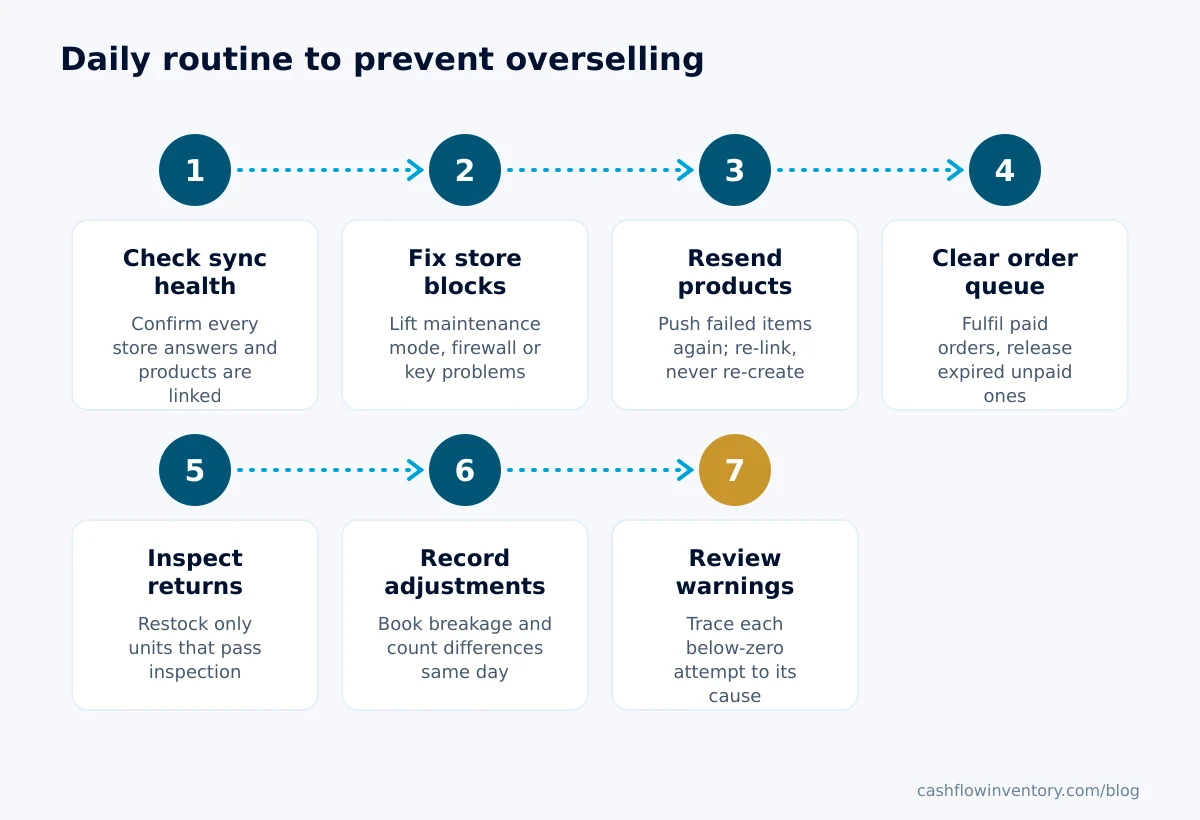
- Check sync health first. Before looking at sales, confirm every store and marketplace connection is answering normally and that no product is stuck as failed or unlinked.
- Fix store-side blocks. If a store is in maintenance mode, behind a security check or refusing the key, fix that on the store. Nothing else matters until updates can reach it.
- Resend failed or unlinked products. Push the affected items again so every listing shows the current quantity. Re-link rather than re-create.
- Clear the order queue. Pick or fulfil yesterday’s paid orders, and cancel unpaid orders past your time limit so their stock is released.
- Inspect returns before restocking. Only units that pass go back into sellable stock; the rest are written off or quarantined.
- Record damage and adjustments. Any breakage, samples or count differences go in as adjustments with a reason, the same day.
- Review below-zero and integrity warnings. Any item that tried to go below zero points to one of the nine causes. Find which one before the next sale repeats it.
Copy-ready overselling prevention checklist
- Every sellable item has one SKU, identical on every channel.
- No listing exists on any store that is not linked to an inventory item.
- Bundles and kits are built from component SKUs.
- “Continue selling when out of stock” is off except on chosen pre-order items.
- Store-admin users cannot edit stock quantities directly.
- Channels list available quantity, not on-hand quantity.
- Fast movers carry a buffer sized with the formula above.
- Unpaid orders have a time limit after which stock is released.
- Returns go through inspection before restocking.
- Purchase receipts are booked only when goods are counted in.
- Top 20 sellers are cycle-counted weekly.
- Sync health is checked every morning.
Common mistakes when trying to stop overselling
Blaming the integration for everything. As the worked example shows, the starting number is often wrong before sync even begins. Faster sync of a wrong figure just spreads the error faster.
Setting a huge buffer everywhere. Holding back 10 units on every SKU stops oversells but shows false stockouts on slow items. It also pushes you toward lost sales from apparent stockouts and over-ordering. Size buffers per SKU.
Fixing oversells by editing stock up. When an order cannot ship, the quick fix is to add stock until the error goes away. That hides the real cause and corrupts your cost of goods. Find the missing receipt or the unrecorded breakage instead.
Deleting and re-creating listings. This breaks the product link, loses reviews and sales history, and can leave a duplicate listing that never receives stock updates.
Treating marketplace warnings as noise. Repeated cancellations for stock reasons usually cost you search ranking or account health on marketplaces. Track every oversell to a cause, even the single-unit ones.
Edge cases generic advice skips
Cash-on-delivery orders
In markets where cash on delivery is common, as it is across much of South Asia and the Gulf, a share of orders are refused at the door. Reserve stock on confirmation, because a confirmed COD order is still a promise. Set a firm confirmation window, though: if the customer does not confirm by phone or message within it, cancel and release.
Refused COD parcels on their way back
A refused parcel is in transit back to you, sometimes for a week or more. Do not count it as sellable until it arrives and passes inspection, exactly like a customer return.
Variants sharing stock
Some products are one physical item listed several ways, such as “mug” and “mug with gift box” where the box is added at packing. Treat the add-on as a kit component so both listings draw from the same mug count.
Packs versus singles
If you sell a pack of 6 and singles from the same cartons, the pack is a kit of 6 singles. Its availability is free singles ÷ 6, rounded down. With 17 free, show 2 packs, not 3.
Stock held by a marketplace’s own fulfilment
Units sent to a marketplace warehouse are not available to your own store. Keep them in a separate location so they never appear in the quantity you push elsewhere.
Several warehouses
If a channel can only ship from one site, push only that site’s stock to it. Pushing the combined total invites orders that cannot be fulfilled from the right place.
Pre-orders
Selling ahead of stock is fine if it is deliberate. Mark the item as a pre-order with a ship date, cap the quantity at what is on your purchase order, and switch it off when that is reached.
How to do this in Cash Flow Inventory
Cash Flow Inventory gives you two controls that cover the hardest causes: silent sync failures and lost links (causes 2 and 3), and stock leaving your books that you never had (the downstream effect of causes 5, 7 and 8).
Watch and repair store sync
Every hour, for every connected store and marketplace, the app checks how the store answers, what happened to each product it sent and which products lost their link.
- Open Integrations, choose the store and open Data & sync.
- Read the Store links card. Each finding says what is wrong and what to do. For example, “Your shop is in maintenance mode, answered with a sign-in page, or a security check is blocking the connection” means nothing can sync until it is lifted. For WooCommerce, let /wp-json through.
- Fix what the finding names on the store side, such as a plugin, maintenance mode or a firewall. If the shop refused the connection’s key, connect the store again.
- Press Send again on a product, or Send all again, to send it now. Both need the integrations edit right.
On each product’s page you see Up to date on the stores or Not up to date on a store. Products that failed or lost their link are repaired automatically. Before creating anything, the app looks the product up on the store by its SKU and links to it if it is already there, which avoids duplicate listings on WooCommerce, Shopify, BigCommerce and eBay.
Retries back off after 15 minutes, 1 hour, 4 hours, 12 hours, 24 hours and 48 hours. After 6 tries the product shows Stopped trying with the reason; fix it and press Send again. On Etsy, TikTok Shop, Shopee, Lazada, Wix, Squarespace, OpenCart and PrestaShop, a product that lost its link is never re-created automatically. Use Data & sync › Re-link items instead. Full details are in the store sync health guide.
Keep stock from going below zero
- Open Settings › Inventory.
- Under Stock below zero, choose Never — refuse the movement. This is the default for new businesses. The other options are Allow, and flag it for review and Allow (not recommended).
- Save. The policy applies to every movement from then on, and the change is recorded in the settings audit.
Be clear about what this does. Orders and pre-orders can still be taken without stock; only the goods going out is refused, until stock is received, transferred in or counted. That covers picks, invoices, the till, kit components, transfers, production issues and purchase returns.
The sales order form will say an item “will be refused when the goods go out”, so staff see the problem before promising a date. The till stops checkout of a plain line beyond stock, and pick sheets show what is on hand before you pick short.
For items already below zero, Reports › Books integrity checks every night, or when you press Run now. Receive any missing purchases first, since that is usually the real cause. Otherwise use Prepare negative stock fixes, which prepares stock-in adjustments to zero at average cost for approval. See the stock never below zero guide for the full list of what is checked and what is exempt.
Expert tip: make the Store links card the first screen you open each morning, before the order list. A finding there explains an oversell before it happens. An order you cannot ship only tells you about it afterwards.
Frequently asked questions
What is the main cause of overselling?
No single cause dominates, but the most damaging is a wrong starting figure. Unrecorded breakage, unreserved orders, bundles that do not deduct components and returns restocked without inspection all inflate the number before any sync happens. Fix the record first, then the sync speed.
How much buffer stock should I hold back on each channel?
Multiply your peak units sold per hour on the other channels by your worst sync delay in hours, round up and add one. Apply it only to fast movers and low-stock items. Slow sellers rarely need a buffer at all.
Should unpaid or cash-on-delivery orders reserve stock?
Reserve on confirmation, not on add-to-cart. For COD orders, confirm with the customer within a set window and release the stock automatically if they do not confirm. That protects real orders without hiding stock behind ones that will never ship.
What should I do when I have already oversold?
Contact the customer quickly with a clear choice: wait for a dated restock, take a substitute or get a full refund. Then trace the order to one of the nine causes and fix it, and book any missing receipt or adjustment rather than editing stock up to make the error disappear.
Does blocking negative stock stop overselling?
Not on its own, because a store can still take the order. It stops goods leaving your books that you never had, keeps cost of goods sold honest, and gives you a clear refusal message naming the item, location and shortfall. That makes the cause easy to find.
How often should stock sync between my stores?
As often as your platforms allow without being throttled. Speed matters less than knowing when sync has stopped, though. A daily check of connection health catches the multi-day freezes that cause batches of oversells.
Overselling is fixable once you treat it as nine separate leaks rather than one mystery. If you want sync health, SKU-based repairs and a below-zero control working together across your stores, start a free trial of Cash Flow Inventory and connect your first store today.