Cycle Count Schedule: How Many Items to Count Each Day
Turn ABC classes into a daily counting number. This guide shows the formula, a worked 1,200-SKU example that comes to 17 items a day, the full rotation calendar, and a copy-ready SOP.
On this page
- Key takeaways
- The cycle count schedule formula
- Starting frequencies by ABC class
- Worked example: items to count each day
- When the number does not divide evenly
- The cycle count calendar, worked out
- How to set up your cycle count schedule: step by step
- Daily cycle count SOP (copy and adapt)
- Recount and tolerance rules
- Common cycle count schedule mistakes
- Edge cases a generic schedule misses
- Small ranges
- Multiple locations
- New SKUs mid-year
- Seasonal items
- Holidays, Ramadan and peak weeks
- Expiry-dated stock
- Year-end and audits
- How to do this in Cash Flow Inventory
- Frequently asked questions
- How many items should I cycle count per day?
- How often should A, B and C items be counted?
- Can cycle counting replace a full annual stocktake?
- What should I do if we miss a counting day?
- Should I count by item or by location?
To build a cycle count schedule, multiply the number of items in each ABC class by how many times a year that class should be counted. Add the totals and divide by the number of counting days you actually have. For example, a shop with 1,200 SKUs that counts A items monthly, B items quarterly and C items twice a year needs to count 17 items a day across 240 counting days.
Most answers stop at “count A items more often”. This page goes further. You get the formula with each part explained, a fully worked example where every figure adds up, and the rotation calendar that tells your team which items to count on day 1, day 21 and day 120.
You also get a copy-ready SOP, recount rules, the edge cases that break schedules (holidays, new SKUs, packed parcels, multiple locations), and the exact steps to run each day’s count in Cash Flow Inventory.
Key takeaways
- Items per day = the sum of (items in class × counts per year) ÷ counting days per year. Use real counting days, not 365.
- Good starting frequencies are A items 12 times a year, B items 4 times and C items 1–2 times. Adjust them once you see where your errors are.
- Split the daily number by class (for example 6 A + 4 B + 7 C) so every class rotates on its own clock and nothing gets skipped.
- Plan for about 48 counting weeks, not 52. The spare weeks absorb holidays, peak season and year-end without breaking the rotation.
- Count, review and approve on the same day. In Cash Flow Inventory only one open count is allowed per location, so an unapproved count blocks tomorrow’s.
The cycle count schedule formula
A cycle count checks part of your stock in turn. Over a year, every item gets counted at least once, and your most important items get counted many times. If you want the wider set of methods first, our guide to cycle counting methods and best practices covers them. This page focuses on the arithmetic of the ABC method, because that is where most schedules go wrong.
Items per day = (A items × A counts per year + B items × B counts per year + C items × C counts per year) ÷ counting days per year
Here is what each part means:
- Items in each class: the number of stocked SKUs or variants in A, B and C. If you have not classified yet, start with ABC analysis and inventory classification. Services and non-stocked items do not count, so leave them out.
- Counts per year: how often you want each item in that class counted. Twelve means monthly and four means quarterly.
- Counting days per year: the days someone will actually count. Five days a week for 48 weeks gives 240. Do not divide by 365 unless you truly count every day.
Run the same formula for each class on its own and you get a per-class daily quota. That split is what makes the calendar work.
Starting frequencies by ABC class
These are decision rules, not laws. Begin here, then move items between classes or change frequencies once you have three months of count results.
| Class | Typical share of SKUs | Counts per year | Move it up a level if… |
|---|---|---|---|
| A | Top value or fastest movers | 12 (monthly) | It is small, portable and high value. Theft-prone items can go to 24. |
| B | Middle group | 4 (quarterly) | It shows a variance on two counts in a row. |
| C | Long tail | 1–2 | It shares a bin or looks similar to another item, so mis-picks are likely. |
Accounting standards such as IAS 2 Inventories require inventory to be measured correctly. They do not prescribe a count frequency, so your frequencies are a business decision. Agree them with your accountant or auditor if a year-end stock figure depends on them.
Worked example: items to count each day
Example: a shop selling phone accessories and spare parts (hypothetical). It has 1,200 stocked SKUs at one location. The team counts Monday to Friday for 48 weeks, which gives 240 counting days. The other 4 weeks cover holidays, the year-end peak and the annual close.
| Class | SKUs | Counts per year | Counts needed per year | Items per day (÷ 240) | Each item counted every | Minutes per item | Minutes per day |
|---|---|---|---|---|---|---|---|
| A | 120 | 12 | 1,440 | 6 | 20 counting days (4 weeks) | 3 | 18 |
| B | 240 | 4 | 960 | 4 | 60 counting days (12 weeks) | 2 | 8 |
| C | 840 | 2 | 1,680 | 7 | 120 counting days (24 weeks) | 2 | 14 |
| Total | 1,200 | — | 4,080 | 17 | — | — | 40 |
Check the arithmetic. 120 × 12 = 1,440, 240 × 4 = 960 and 840 × 2 = 1,680, which totals 4,080. Then 4,080 ÷ 240 = 17 items a day. The rotation lengths agree with the daily quotas: 120 A items ÷ 6 per day = 20 days, 240 ÷ 4 = 60 days and 840 ÷ 7 = 120 days.
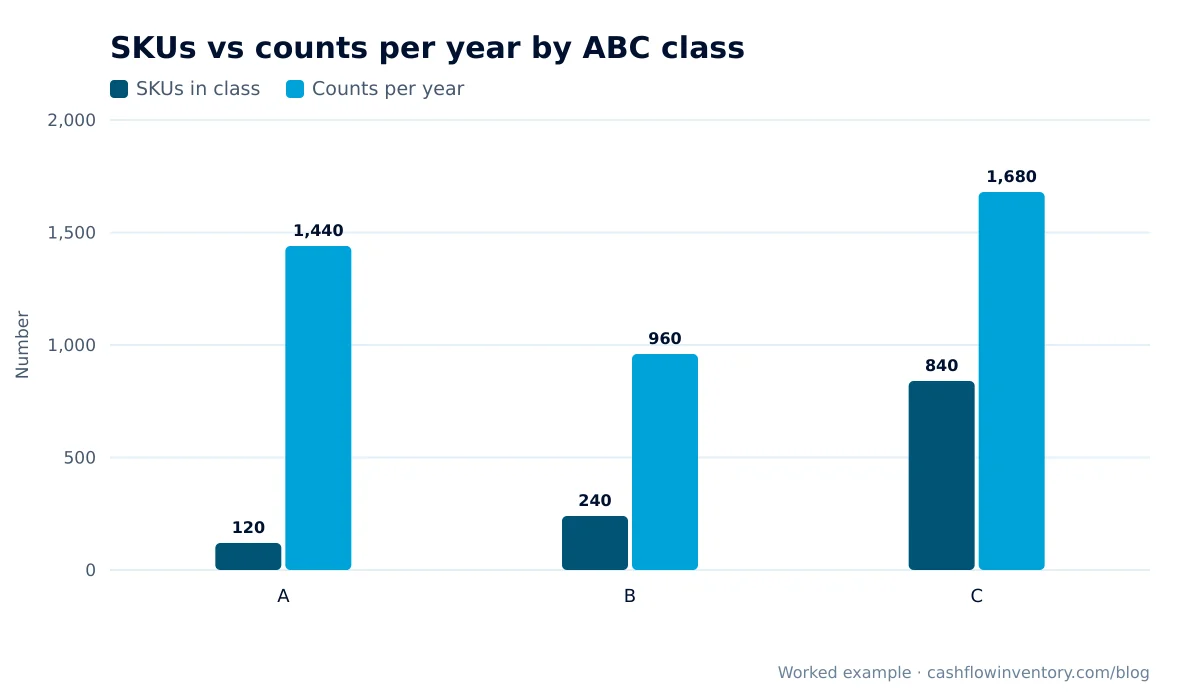
The chart shows why ABC scheduling matters. A items are only one tenth of the range, yet they take more than a third of all counts. C items are 70% of the range, but each one is counted only twice.
When the number does not divide evenly
Real numbers rarely come out as tidy as 17. Suppose you had 250 counting days instead. You would get 1,440 ÷ 250 = 5.76 A items, 960 ÷ 250 = 3.84 B items and 1,680 ÷ 250 = 6.72 C items. Round each class up, to 6, 4 and 7. Rounding up means each rotation finishes a few days early, which builds in slack. Rounding down means the rotation runs past its target and you quietly miss counts.
The cycle count calendar, worked out
Number the items in each class in shelf order (aisle, then bay, then shelf). Then give each counting day the next block from each class. Counters walk one short route instead of crossing the store, and you can see at a glance where each class’s rotation stands.
| Counting day | A items (6/day) | B items (4/day) | C items (7/day) | What happens |
|---|---|---|---|---|
| Day 1 | A 1–6 | B 1–4 | C 1–7 | All three rotations start |
| Day 2 | A 7–12 | B 5–8 | C 8–14 | Next block in each class |
| Day 20 | A 115–120 | B 77–80 | C 134–140 | First A rotation complete |
| Day 21 | A 1–6 | B 81–84 | C 141–147 | A starts its 2nd rotation |
| Day 60 | A 115–120 | B 237–240 | C 414–420 | 3rd A rotation and 1st B rotation complete |
| Day 120 | A 115–120 | B 237–240 | C 834–840 | 6th A, 2nd B and 1st C rotation complete |
| Day 240 | A 115–120 | B 237–240 | C 834–840 | 12 A, 4 B and 2 C rotations: year done |
In calendar terms, every A item is counted once every 4 working weeks, every B item once every 12 weeks and every C item once every 24 weeks. Twelve, four and two counts fit inside 48 weeks, so the 4 spare weeks are true buffer.
How to set up your cycle count schedule: step by step
- List only stocked items. Remove services, non-stocked items and dead SKUs with no stock. Count variants (size, colour) as separate items, because each one sits in its own spot and can be wrong on its own.
- Classify A, B and C. Use annual consumption value (units sold × cost per unit). Then promote small, high-theft and frequently mis-picked items by hand.
- Choose frequencies. Start with 12, 4 and 2, or 12, 4 and 1 if you are short of staff.
- Count your real counting days. Take working days per week × weeks you will count. Leave out peak season, stock-take weeks and public holidays.
- Calculate per-class daily quotas with the formula, rounding each class up.
- Time a test day. Count one day’s list and record the minutes. If it runs over 45–60 minutes, counting will be rushed. Lower the C frequency or add a counter.
- Number items in shelf order and build the rotation calendar like the table above.
- Write recount and approval rules (below) before the first count, not after the first argument.
- Review quarterly. Reclassify, move error-prone items up a class and check that each rotation is on track.
Daily cycle count SOP (copy and adapt)
- Count at a fixed time when receiving and picking are quiet, such as first thing or the last hour.
- Confirm yesterday’s count is approved or cancelled before starting today’s.
- Print or open today’s sheet: 6 A, 4 B and 7 C items in shelf order.
- Count blind. The counter does not see the system quantity.
- Check the whole location for each item: back stock, overflow, returns shelf and display.
- Skip anything already picked and waiting for the courier. It has left stock even if it is still on the packing table.
- Enter every line. Leave nothing blank and never write a zero you did not physically confirm.
- Recount any line outside tolerance, using a second person where possible.
- Record a reason for each accepted difference: mis-pick, receiving error, damage, theft or unit-of-measure mix-up.
- The manager approves the same day. Fix the root cause of any repeated reason.
Recount and tolerance rules
- A items: recount any difference at all. Escalate to the manager if it is confirmed.
- B items: recount if the difference is more than 2 units or more than a value you set, for example the price of one unit.
- C items: recount if the difference is more than 5% of the expected quantity or above your value limit.
- Any item that is wrong twice in a row moves up one class for the next quarter.
Common cycle count schedule mistakes
- Dividing by 365 or 260. If you only count on 230 days, a schedule built on 260 will fall about a month behind by year-end.
- One daily number with no class split. Counters drift to easy C shelves, and A items quietly miss their monthly count.
- Counting while goods are being received. Stock half put away creates false variances. Finish receiving first; our goods receiving SOP keeps that step clean.
- Adjusting without a reason. An adjustment with no cause fixes the number today and lets the same error happen tomorrow.
- Leaving counts open. Unapproved counts pile up, the system figure stays wrong, and reorder decisions are based on bad stock. That is how you get avoidable stockouts.
- Never revisiting classes. Last year’s C item may be this year’s best seller.
Expert tip: Keep a “doubt list” next to the schedule. When a picker finds an empty bin that should be full, or a customer complains about a missing item, spot-check it the same day on top of the 17. These targeted checks find more errors per minute than the rotation does.
Edge cases a generic schedule misses
Small ranges
With 300 SKUs, the same frequencies come to about 4 items a day. That is too little to be worth setting up daily. Count weekly instead: divide the yearly counts by 48 weeks and do the whole batch in one session.
Multiple locations
Each shop or warehouse needs its own schedule, because the same SKU can be right in one place and wrong in another. Calculate the daily number per location from that location’s stocked items.
New SKUs mid-year
Add new items to the end of their class list and count them within two weeks of first receipt. The first count after launch catches setup errors such as the wrong unit, pack size or barcode.
Seasonal items
Count seasonal stock just before the season, so you reorder from true numbers, and again just after, so you know what to carry over. Our guide to SOS analysis for seasonal items helps you decide which items count as seasonal.
Holidays, Ramadan and peak weeks
Do not try to count through your busiest weeks. The 4 buffer weeks in the example exist for this. Pause the rotation, then resume from the same day number. Never restart from day 1.
Expiry-dated stock
For food, cosmetics or pharmacy lines, write off expired lots before counting. Otherwise counters record stock you cannot sell, and the count looks fine while the value is overstated.
Year-end and audits
If your auditor or tax adviser relies on a perpetual system instead of a full stocktake, they will want evidence that cycle counts ran on schedule and that differences were approved. Tax rules on inventory, such as those described in IRS Publication 538 for US businesses, expect consistent, supportable records. Keep the count history.
How to do this in Cash Flow Inventory
Cycle counts run from Inventory › Stock counts. Full instructions are in the stock counts and reconciliation guide. Here is how to run the daily schedule above.
- Make sure the people counting have the stock count rights, and the manager has the approve right. Set this up under settings, users and permissions.
- Open Inventory › Stock counts and choose Start a count.
- Choose Some categories if your categories match your shelf blocks, or Chosen items to pick exactly today’s 17 items from your rotation list.
- Choose the Location and give a Count name that matches your calendar, such as “Cycle day 021”. Then pick the categories or items.
- Set Items per sheet. Tick One category per sheet if two people split the aisles.
- Decide whether to tick Freeze stock while counting. For a short daily count during trading hours, leaving it unticked is usually better. The sheet remembers what the system had when it was made, and on approval only the difference is added to today’s on hand, so sales recorded while you counted are kept. Freeze only if nothing should move until approval.
- Choose who it is Counted by and start the count.
- Open each sheet and enter the quantity counted for each line, saving as you go. Lines start blank, so “not counted yet” is never mistaken for zero. Saving a line sets its counted figure; it does not add to the earlier one.
- Products picked onto a parcel that is still waiting for the courier show “packed on PL-… — not stock, don’t count”. Skip those units.
- Review the differences, give a reason where needed, and accept the lines you agree with. Approve the sheet, either all differences or the accepted ones only. Approval posts the stock movements and the journal in one step, with a full trail.
Approve the same day. Only one open count is allowed per location at a time, so an open count from yesterday stops you starting today’s.
For your doubt list, use the quick spot check. From Inventory › Products › Variants, tick a few variants and count them in a small window. With the approve right, stock is corrected at once; otherwise the count goes for approval.
For expiry-dated lines, use Write off expired stock on the same screen before counting. Choose the location, Expired on or before and optionally a category. It is refused while a frozen count holds the location, so run it first.
Services and not-stocked items are left out of count sheets automatically. Check each product’s type in the item types guide so your SKU total matches what the sheets will show. When you close the month, the approved counts support the stock value you sign off in period close and lock.
Frequently asked questions
How many items should I cycle count per day?
Multiply the items in each ABC class by its counts per year, add them up, and divide by your counting days. For 1,200 SKUs counted 12, 4 and 2 times a year over 240 days, that is 17 items a day. Your number depends on your range size and frequencies, not on a fixed rule.
How often should A, B and C items be counted?
A common starting point is monthly for A, quarterly for B and once or twice a year for C. Increase the frequency for small, valuable or error-prone items. Reduce C counts if the daily workload is more than your team can do accurately.
Can cycle counting replace a full annual stocktake?
Often yes, if every item is counted at least once in the year, differences are investigated and approved, and the records are kept. Whether your auditor or tax adviser accepts it is their call, so agree the approach with them before year-end.
What should I do if we miss a counting day?
Do not double up the next day if that would rush the count. Carry on from the missed day number and use one of your buffer weeks to catch up. If you have no buffer left, recalculate the daily quota with the remaining counting days.
Should I count by item or by location?
Count by item, but check every place that item lives, including overflow, returns and display. Counting a single bin and missing the back stock is one of the most common causes of false differences.
A schedule only helps if counting, review and approval happen in the same place as your sales and purchases. If you want daily cycle counts that post straight to stock and the books, look at Cash Flow Inventory’s inventory management software or start a free trial and run day 1 of your rotation this week.