Purchase Returns and Supplier Credit Notes: The Journal Entries
The exact journal entries for sending goods back to a supplier: before and after you pay the bill, partial credits, restocking fees, price allowances with no goods returned, and VAT, all in one worked example.
On this page
- Key takeaways
- How a purchase return journal entry works
- Perpetual system (stock updated on every movement)
- Periodic system (stock counted at period end)
- The two formulas you will use most
- Which entry to use: decision rules
- Worked example: returns, partial credits and allowances
- Purchase returns with VAT or GST
- Step by step: processing a purchase return and supplier credit note
- Supplier credit note checklist (copy this)
- Common mistakes with purchase return entries
- Edge cases generic answers skip
- The goods have already been sold
- The supplier replaces the goods instead of crediting
- The credit is bigger than the bill
- The return crosses a period end
- Foreign-currency suppliers
- Landed costs on returned goods
- How to do this in Cash Flow Inventory
- Before you start
- The steps
- What posts to the books
- Frequently asked questions
- Is a purchase return a debit or a credit?
- What is the journal entry for a purchase return after the bill is paid?
- What is the difference between a debit note and a credit note in a purchase return?
- How do I record a supplier credit note when no goods are returned?
- Where does a restocking fee go in the journal entry?
- Do I need to reverse VAT or GST on a purchase return?
A purchase return journal entry reduces what you owe the supplier and takes the goods out of your stock: debit Accounts Payable and credit Inventory (or credit Purchase Returns if you use a periodic system) for the value of the goods sent back. If you have already paid the bill, debit a supplier receivable instead of Accounts Payable. When the refund arrives, debit Bank and credit that receivable.
That is the one-line answer. Real returns are messier. The supplier charges a restocking fee. The credit note arrives three weeks after the goods left. Half the batch has already been sold when the supplier agrees a price reduction. VAT or GST has to be reversed.
This page walks through all of those cases with one worked example that adds up line by line. You also get a decision table you can pin next to your desk, a checklist for processing supplier credit notes, and the exact steps in Cash Flow Inventory.
Key takeaways
- Before payment, a return reduces Accounts Payable. After payment, it creates a balance the supplier owes you, which you either use on the next bill or take back as a refund.
- A partial credit, such as one reduced by a restocking fee, splits the entry: the credited part goes to payables and the shortfall goes to an expense account.
- A price allowance with no goods returned is split between Inventory (for units still on hand) and Cost of Goods Sold (for units already sold).
- Reverse the input tax on the credit note as well as the net amount. Otherwise you will over-claim VAT or GST.
- Keep the return (goods leave) and the credit (money side) as two separate events. That way you never lose track of a credit the supplier still owes you.
How a purchase return journal entry works
Every purchase return has two sides. The goods side takes units out of stock. The money side reduces what you owe, or creates a claim on the supplier. In a small shop both often happen on the same day. In a busier business they can be weeks apart, and that gap is where most errors come from.
The accounts you use depend on your inventory system. For a refresher on the original purchase entries, see our guide to inventory journal entries and best practices.
Perpetual system (stock updated on every movement)
The return credits Inventory directly, because Inventory was debited when the goods arrived. Before payment the debit goes to Accounts Payable. After payment it goes to a supplier receivable, often called a supplier debit balance or supplier advance.
Periodic system (stock counted at period end)
Purchases were debited to a Purchases account, so the return credits Purchase Returns and Allowances, a contra account that reduces purchases. Inventory is not touched until the period-end count.
Under IFRS, IAS 2 Inventories requires trade discounts, rebates and similar items to be deducted when you work out the cost of purchase. That is why allowances on goods still in stock reduce inventory value rather than being booked as income. US GAAP follows the same logic in the inventory topic maintained by the Financial Accounting Standards Board.
The two formulas you will use most
Supplier credit = returned quantity × unit price on the bill + tax on that amount − any restocking fee
Return price difference = credit amount (before tax) − returned quantity × current average cost
The second formula matters if you value stock at weighted average cost. Goods leave stock at today’s average, which is rarely the exact price on the bill you are returning against. Our FIFO vs weighted average worked example shows why those two numbers drift apart.
Which entry to use: decision rules
Use this table to pick the right entry before you open the journal. All entries assume a perpetual system and amounts before tax. Tax is covered in its own section below.
| Situation | Debit | Credit |
|---|---|---|
| Goods returned, bill not yet paid, full credit | Accounts Payable | Inventory |
| Goods returned, bill already paid | Supplier receivable (supplier balance) | Inventory |
| Refund received for a paid bill | Bank or cash | Supplier receivable |
| Partial credit (restocking fee kept by supplier) | Accounts Payable or supplier receivable (credit amount); Restocking fee expense (shortfall) | Inventory (full cost of goods returned) |
| Price allowance, no goods returned | Accounts Payable (or supplier receivable if paid) | Inventory (share still on hand); Cost of Goods Sold (share already sold) |
| Goods returned, credit note not yet received | Returns awaiting credit (or a clearing account) | Inventory |
The last row is the one generic answers skip. If the goods have left but the credit note has not arrived, park the value in a clearing account. Reverse it into Accounts Payable when the credit is confirmed. Do not reduce payables on a promise.
Worked example: returns, partial credits and allowances
Example: a shop selling handmade kitchenware (a hypothetical business, “Hearth & Clay”). It uses a perpetual system and buys from two suppliers on 30-day terms. Amounts are in dollars, but the logic is the same in rupees, dirhams or pounds. Tax is left out here and handled in the next section.
- Mugs: 100 mugs at $8.00 = $800. Ten arrive chipped and are returned before the bill is paid. Later, the supplier agrees a $0.50 per mug allowance on the 90 kept, for late delivery. By then 54 have been sold and 36 are on hand.
- Bowls: 50 bowls at $12.00 = $600, paid on delivery. Five are the wrong glaze and go back after payment. The supplier keeps a 10% restocking fee and refunds the rest.
| # | Event | Debit | Credit | Amount | You owe supplier after |
|---|---|---|---|---|---|
| 1 | Receive 100 mugs at $8.00 | Inventory | Accounts Payable | 800.00 | 800.00 |
| 2 | Return 10 chipped mugs before payment (10 × $8.00) | Accounts Payable | Inventory | 80.00 | 720.00 |
| 3 | Allowance $0.50 × 90 mugs = $45; 36 on hand, 54 sold | Accounts Payable 45.00 | Inventory 18.00; Cost of Goods Sold 27.00 | 45.00 | 675.00 |
| 4 | Pay mug bill | Accounts Payable | Bank | 675.00 | 0.00 |
| 5 | Receive 50 bowls at $12.00 | Inventory | Accounts Payable | 600.00 | 600.00 |
| 6 | Pay bowl bill on delivery | Accounts Payable | Bank | 600.00 | 0.00 |
| 7 | Return 5 bowls after payment (cost $60); credit $54, fee $6 | Supplier receivable 54.00; Restocking fee expense 6.00 | Inventory 60.00 | 60.00 | (54.00) supplier owes you |
| 8 | Supplier refunds the credit | Bank | Supplier receivable | 54.00 | 0.00 |
Check the arithmetic.
- Mugs: $800 − $80 − $45 = $675, which is exactly what was paid.
- Mug stock: 54 mugs were sold at $8.00, so $432 went to Cost of Goods Sold when they sold. Inventory is now $800 − $80 − $432 − $18 = $270. That equals 36 mugs × $7.50, the new net cost per mug.
- Bowls: $600 paid − $54 refunded = $546 net cash out. That splits into $540 for the 45 bowls kept (45 × $12) and the $6 fee.
Every figure ties back.
Notice what step 3 does. Crediting the whole $45 to Inventory would overstate the reduction in stock value. It would leave the 36 mugs on hand at $7.00 each instead of $7.50, and it would overstate the cost of the 54 already sold.
Purchase returns with VAT or GST
When the original bill carried input tax that you reclaimed, the credit note reverses part of that claim. Take the Hearth & Clay mug return in a VAT setting at 20%:
| Line | Debit | Credit |
|---|---|---|
| Accounts Payable (gross credit: 80.00 + 16.00) | 96.00 | |
| Inventory (net) | 80.00 | |
| Input VAT (20% × 80.00) | 16.00 | |
| Totals | 96.00 | 96.00 |
The tax rules on credit notes and how long you have to adjust differ by country. In the UK, HMRC sets out the rules in VAT Notice 700. In India, credit notes under GST are filed and matched through the GST portal. Check your own authority’s guidance for the timing and document wording it requires.
Step by step: processing a purchase return and supplier credit note
This is the procedure behind every row in the example. It works in any system, manual or software.
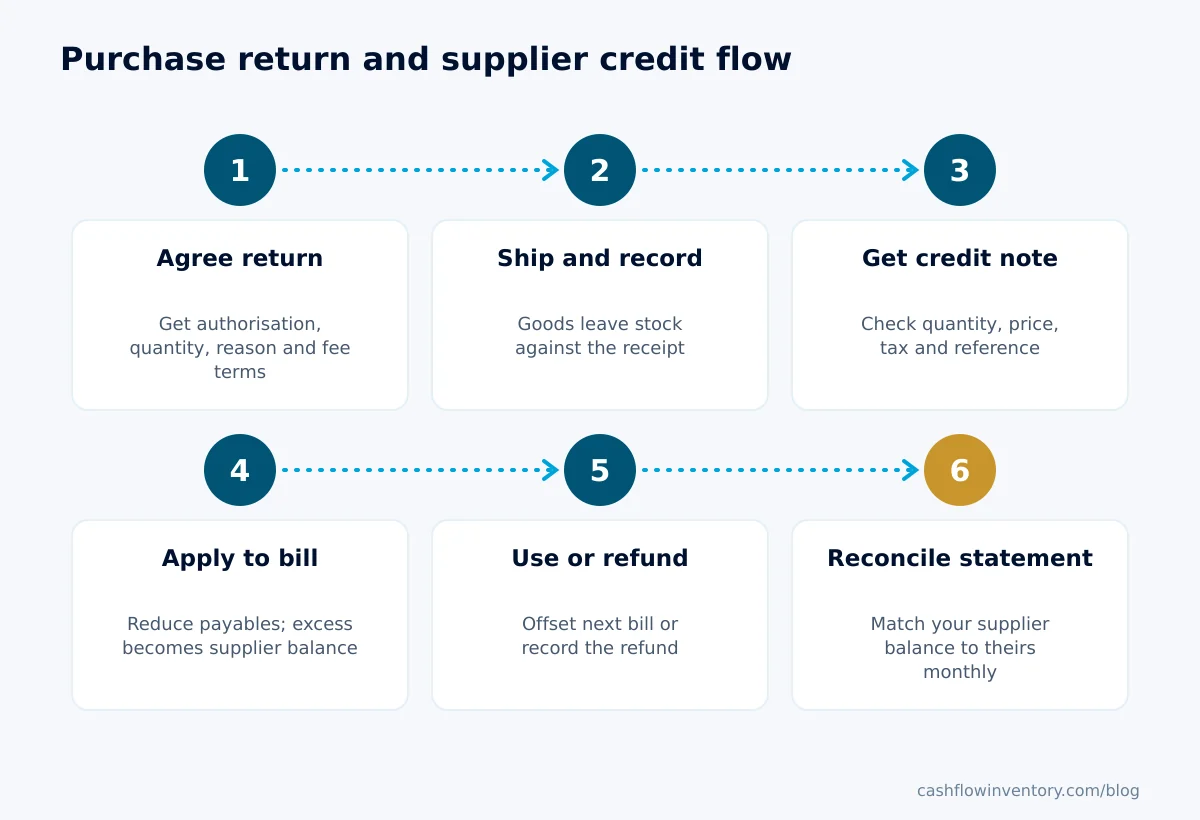
- Agree the return with the supplier. Get their return authorisation number, the quantity, the reason and how they will credit you: full, partial or replacement. Write down any restocking fee.
- Ship the goods and record the stock leaving. Take the units out of stock on the day they physically leave, against the original goods receipt. If the credit is not yet confirmed, post the value to a returns-awaiting-credit account.
- Receive the supplier’s credit note. Check the quantity, unit price, tax and reference against your return. If the supplier wants a debit note from you first, send it now.
- Apply the credit to the bill. If the bill is unpaid, reduce Accounts Payable. If it is paid, or the credit is larger than what you still owe, move the excess to the supplier receivable.
- Use the balance or take a refund. Either offset it against the next bill or record the refund when the money lands in your bank.
- Reconcile the supplier statement. At month end, confirm that your supplier balance matches theirs, including credits in transit.
Supplier credit note checklist (copy this)
- Credit note references our original bill number and the supplier’s return authorisation.
- Quantity matches what physically left our premises (delivery note or courier proof attached).
- Unit price matches the price on the original bill, not today’s list price.
- Tax is calculated at the rate on the original bill and shown separately.
- Any restocking fee, freight deduction or handling charge is stated, and agreed in writing.
- Credit is posted once, against the right bill, with the document attached.
- Remaining supplier balance is either scheduled against the next bill or chased as a refund.
- Return status is cleared from “awaiting credit” once the credit is posted.
Common mistakes with purchase return entries
- Booking the credit note as income. A supplier credit is a reduction in cost, never revenue. Booking it as income inflates both sales-side figures and gross margin.
- Crediting Purchases in a perpetual system. If Inventory was debited on receipt, crediting a Purchases or Purchase Returns account without also taking the goods out of Inventory leaves phantom stock on the balance sheet.
- Reducing payables before the credit is confirmed. The supplier may refuse, or credit less. Use a clearing account until you have the credit note.
- Editing or deleting the original bill. The bill was correct when issued. Overwriting it destroys the audit trail and makes your records disagree with the supplier’s statement. Record the credit as its own document.
- Posting the same credit note twice. This often happens once from the email copy and once from the paper copy. Our guide on preventing duplicate entries in your inventory system covers controls that catch it.
- Forgetting the tax. Reversing only the net amount leaves you over-claiming input tax until someone spots it on an audit.
- Letting debit balances sit on Accounts Payable. A supplier balance in your favour is cash you are owed. Review it monthly and chase anything older than one billing cycle.
Edge cases generic answers skip
The goods have already been sold
You cannot send back what you no longer hold. If a customer returned a faulty unit to you and you then pass it back to the supplier, the unit must first come back into your stock through a sales return. Only then can it go out again as a purchase return.
The supplier replaces the goods instead of crediting
Record the return as normal, then a new receipt for the replacements against the same bill. The value nets to zero on payables, but your stock movements show what actually happened. That matters for lot and serial tracking.
The credit is bigger than the bill
Apply what you owe on that bill and move the rest to the supplier receivable. Do not leave a negative bill open.
The return crosses a period end
If goods left in March but the credit note is dated April, the March accounts should still show the stock gone. The value sits in returns awaiting credit, not in Inventory and not in Accounts Payable.
Foreign-currency suppliers
Record the credit at the exchange rate on the credit note date. When it is settled or refunded at a different rate, the difference is an exchange gain or loss. It is not an adjustment to inventory.
Landed costs on returned goods
If the returned units carried freight or duty in their cost, the supplier usually credits only the product price. The unrecovered landed cost is a real loss. Book it to an expense rather than leaving it buried in the remaining stock.
Expert tip: agree restocking fees and return freight terms when you negotiate the supply agreement, not when the first damaged pallet arrives. Our guide to successful supplier negotiation covers the clauses worth fixing in advance.
How to do this in Cash Flow Inventory
In Cash Flow Inventory, purchase returns live under Purchasing › Returns, which has three tabs: Returns, Supplier credits and Refunds. A return works in two steps, matching the goods side and money side described above. The full reference is in the purchase returns and supplier credits guide.
Before you start
- The goods must have come in on a goods receipt and still be in stock. Receipts are covered in the receiving goods guide.
- If items are tracked, the lots and serial numbers must be the ones that receipt brought in.
- The person needs the right to add purchase returns. Refunds need the supplier refund right.
The steps
- Open Purchasing › Goods received and choose Return goods in the receipt’s row menu. Alternatively, choose New return on Purchasing › Returns and pick the receipt.
- Enter the quantity of each line going back, with its lots or serial numbers.
- Tick credit it now if the supplier has already agreed the credit.
- Save. The goods leave stock, and the return shows as Waiting for credit if it is not credited yet.
- When the supplier confirms the credit, choose Credit on the return.
- If credit is left over after the bill, record the supplier’s refund on the Refunds tab when the money arrives.
What posts to the books
- Return saved: stock leaves at the current average cost, as Dr Purchase Returns / Cr Inventory.
- Credit: Dr Accounts Payable for the part applied to the bill, and Dr Supplier Balance for the refundable part / Cr Purchase Returns. What remains in Purchase Returns is the difference between the price and the stock’s cost, which is the return price difference from the formula above.
- Refund: Dr the account the money went into / Cr Supplier Balance.
The credit’s value is the returned share of the receipt lines, price plus tax. It reduces the goods bill first. If the bill was already paid, or the credit is larger than what is owed, the rest becomes the supplier’s balance in your favour. You can use that balance on later bills with Pay from the supplier’s balance, as described in the payments made to suppliers guide. You can also have it refunded into Undeposited Funds or a cash or bank account.
If you credited by mistake, Uncredit undoes the credit exactly, as long as nothing has been refunded from it. A return can be deleted only once it is uncredited, and the goods then come back into stock.
For a price reduction with no goods back, like step 3 of the example, a purchase return is not the tool. Use Correct prices on the bill instead, described in the bills and accounts payable guide. The difference goes to stock value for goods still on hand and to cost of goods for goods already sold.
Files attached to a return, such as the supplier’s credit note or courier proof, appear in the central document list. If you keep your ledger in QuickBooks Online or Xero, see the accounting software sync guide for what is sent and how totals are checked.
Frequently asked questions
Is a purchase return a debit or a credit?
Both, like every journal entry. Accounts Payable (or a supplier receivable) is debited, because you owe less. Inventory, or Purchase Returns in a periodic system, is credited, because the goods have left.
What is the journal entry for a purchase return after the bill is paid?
Debit a supplier receivable and credit Inventory for the value of the goods returned. When the supplier refunds you, debit Bank and credit the supplier receivable. If they offset it against your next bill instead, debit Accounts Payable on that bill and credit the supplier receivable.
What is the difference between a debit note and a credit note in a purchase return?
You, the buyer, issue a debit note to tell the supplier you are charging the return back to them. The supplier issues a credit note to confirm they have reduced what you owe. Post your entry from the supplier’s credit note, or from your agreed debit note if that is the practice in your country.
How do I record a supplier credit note when no goods are returned?
Treat it as a price allowance. Debit Accounts Payable for the credit amount. Credit Inventory for the share relating to units still in stock, and Cost of Goods Sold for the share relating to units already sold. Reverse the input tax on the allowance as well.
Where does a restocking fee go in the journal entry?
Debit it to an expense account, such as restocking fees or purchase return charges. Credit Inventory with the full cost of the goods returned. Accounts Payable or the supplier receivable only gets the amount the supplier actually credited.
Do I need to reverse VAT or GST on a purchase return?
Yes, if you reclaimed input tax on the original bill. The credit note reduces your input tax by the tax on the returned amount, so credit your input tax account alongside Inventory. Timing and document rules vary by country, so follow your tax authority’s guidance on credit notes.
Purchase returns stop being a month-end headache once the goods side and the money side are recorded as separate, linked events with the right accounts behind them. If you want returns, supplier credits, refunds and bill price corrections to post these entries for you, start a free trial of Cash Flow Inventory and run your next supplier return through Purchasing › Returns.