Mobile and Electronics Shops: Track IMEI and Serial Numbers and Warranties
A practical playbook for phone and electronics shops: record every IMEI and serial number from purchase to sale, answer warranty claims in seconds, and handle returns and swaps without losing track of a single unit.
On this page
- Key takeaways
- What IMEI and serial number tracking means for a phone shop
- The four moments where the serial must be captured
- Warranty look-up: the rule to use at the counter
- Worked example: a month of serialised phone stock that reconciles
- The IMEI tracking process, step by step
- Copy-ready counter checklist for a phone return or warranty claim
- Decision rules for returns and swaps
- Common IMEI tracking mistakes
- Edge cases generic answers skip
- Dual-SIM phones and eSIM
- Manufacturer replacements with a new IMEI
- Used and trade-in phones
- Bundles and accessories
- Phones sold online and shipped
- How to do this in Cash Flow Inventory
- 1. Set up and receive with serial numbers
- 2. Sell at the counter
- 3. Take a return or a swap
- 4. Keep the evidence
- Frequently asked questions
- What is the difference between an IMEI and a serial number?
- Do I need IMEI tracking software, or is a spreadsheet enough?
- How do I check if a phone is still under warranty?
- Should a warranty swap restart the warranty?
- What do I do with a faulty phone after a swap?
- How often should a phone shop count stock by IMEI?
IMEI tracking software records each phone’s unique 15-digit IMEI, or each device’s serial number, when you receive it from a supplier and again when you sell it. That lets you answer three questions in seconds: is this unit ours, who bought it and when, and is it still under warranty. Without a serial captured at both ends, every return and warranty claim turns into an argument based on memory and receipts.
This page gives you the full method for a mobile or electronics shop. It covers what to capture and when, a worked month of serial-level stock with figures that reconcile, a warranty look-up rule you can apply at the counter, and decision rules for returns and swaps. It also covers the edge cases generic answers skip: dual-SIM phones, eSIMs, replacement units with new IMEIs, and swap fraud.
The last section shows how to run the process in Cash Flow Inventory, using its receiving, point of sale and sales returns screens.
Key takeaways
- Capture the IMEI or serial at receipt, not at sale. If it is not recorded when the box arrives, you cannot prove later that a returned unit came from you.
- Scan, never type. Check that the 15-digit IMEI on the box matches the one the phone shows when you dial *#06#.
- Warranty status comes from the sale date on the invoice that carries that serial. Write your rule down so every staff member applies it the same way.
- Treat a warranty swap as two linked events: a return of the faulty serial and a sale of the replacement serial. Never just hand over a new box.
- Count serialised stock by serial, not by quantity. A count of 14 that should be 14 can still hide a wrong unit on the shelf.
What IMEI and serial number tracking means for a phone shop
Most stock is tracked by quantity: you had 20 chargers, you sold 6, you have 14. Phones, laptops, tablets, smartwatches and consoles need more than that, because each unit is different in the ways that matter to you. Each has its own warranty clock, its own return history, and possibly its own legal status if it is ever reported stolen.
The IMEI (International Mobile Equipment Identity) is a 15-digit number assigned to each cellular device. The first eight digits are the Type Allocation Code identifying the make and model, and the last digit is a check digit. The scheme is administered by the GSMA, the mobile industry body. Devices without a cellular radio, such as many laptops, earbuds and Wi-Fi tablets, carry a manufacturer serial number instead. For tracking purposes, treat both the same way: one identifier, one unit.
If you want the general background on unit-level tracking first, our guide to serial number tracking for small businesses covers the basics. This page is the version for the phone and electronics counter.
The four moments where the serial must be captured
- Receipt: every unit’s serial is entered against the supplier’s purchase order. This proves the unit was yours and what it cost.
- Sale: the exact serial handed over is recorded on the customer’s invoice. This starts the warranty clock and links the unit to a person.
- Return or swap: the serial coming back must be one that left on that invoice. Anything else is a different phone.
- Count: the shelf is checked serial by serial against the system, not just by total quantity.
Warranty look-up: the rule to use at the counter
When a customer walks in with a faulty phone, you need three facts quickly: was it sold by you, on what date, and under which warranty. If the serial was recorded on the sale, you find the invoice and you have all three. If it was not, you are relying on the customer’s paperwork.
Use one written rule for when coverage ends, so two staff members never give a customer two different answers:
Warranty end date = sale date on the invoice + warranty period − 1 day
The parts:
- Sale date: the date on the invoice that carries this serial, not the date printed on the box and not the date the customer remembers.
- Warranty period: the period that applies to this product and channel. That is usually the manufacturer’s warranty for new devices, and your own shop warranty for refurbished or used devices.
- − 1 day: a phone sold on 14 March with 12 months’ cover is covered through 13 March the following year. Some manufacturers count differently. If yours do, follow their terms and update the rule.
Keep three kinds of cover separate in your head and on your receipts. The manufacturer’s warranty is handled through the brand’s service centre. Your shop warranty is a promise you make and pay for yourself. Statutory consumer rights apply whatever you print. In the UK, for example, the Consumer Rights Act 2015 gives buyers a short-term right to reject faulty goods. Check the rules in each country you sell in, and never word a receipt as though it removes them.
Expert tip: Print the warranty end date on the receipt next to the IMEI. The customer stops arguing about dates, and your staff stop calculating them under pressure at a busy counter.
Worked example: a month of serialised phone stock that reconciles
Example: a shop selling phones and accessories. “Northgate Mobiles” is a hypothetical single-counter shop. It carries two phone models, both tracked by IMEI. Model A costs 220 per unit from the distributor and Model B costs 140. During the month it receives one purchase order, sells through the till, accepts three in-window returns and handles two warranty swaps.
| Movement (units) | Model A | Model B | Total |
|---|---|---|---|
| Opening sellable stock | 10 | 8 | 18 |
| Received on purchase order (+) | 20 | 20 | 40 |
| Sold to customers (−) | 22 | 23 | 45 |
| Returned unopened within return window, back to sellable (+) | 2 | 1 | 3 |
| Replacement units issued on warranty swaps (−) | 1 | 1 | 2 |
| Closing sellable stock | 9 | 5 | 14 |
| Unit cost | 220 | 140 | — |
| Closing sellable stock at cost | 1,980 | 700 | 2,680 |
| Faulty units held for supplier claim (not sellable) | 1 | 1 | 2 |
| Faulty units at cost | 220 | 140 | 360 |
Check the arithmetic. Model A: 10 + 20 − 22 + 2 − 1 = 9. Model B: 8 + 20 − 23 + 1 − 1 = 5. Total: 18 + 40 − 45 + 3 − 2 = 14. At cost, 9 × 220 = 1,980 and 5 × 140 = 700, which makes 2,680. The two faulty units are worth 220 + 140 = 360, and they sit outside sellable stock until the distributor credits or replaces them.
At month end, staff scan all 14 sellable phones. The count matches by quantity. However, one Model A box on the shelf has an IMEI that the system shows as sold three weeks earlier. A customer had swapped boxes during a “return”, and only a serial-level count catches that. A quantity-only count would have passed it.
The example shows why serial tracking pays for itself. One wrong Model A unit is 220 at cost and a lost warranty claim, plus a customer who may come back later with a phone you cannot prove you sold. If you track how much of your value sits in stock and in claims, our list of retail KPIs to track shows where these numbers fit.
The IMEI tracking process, step by step
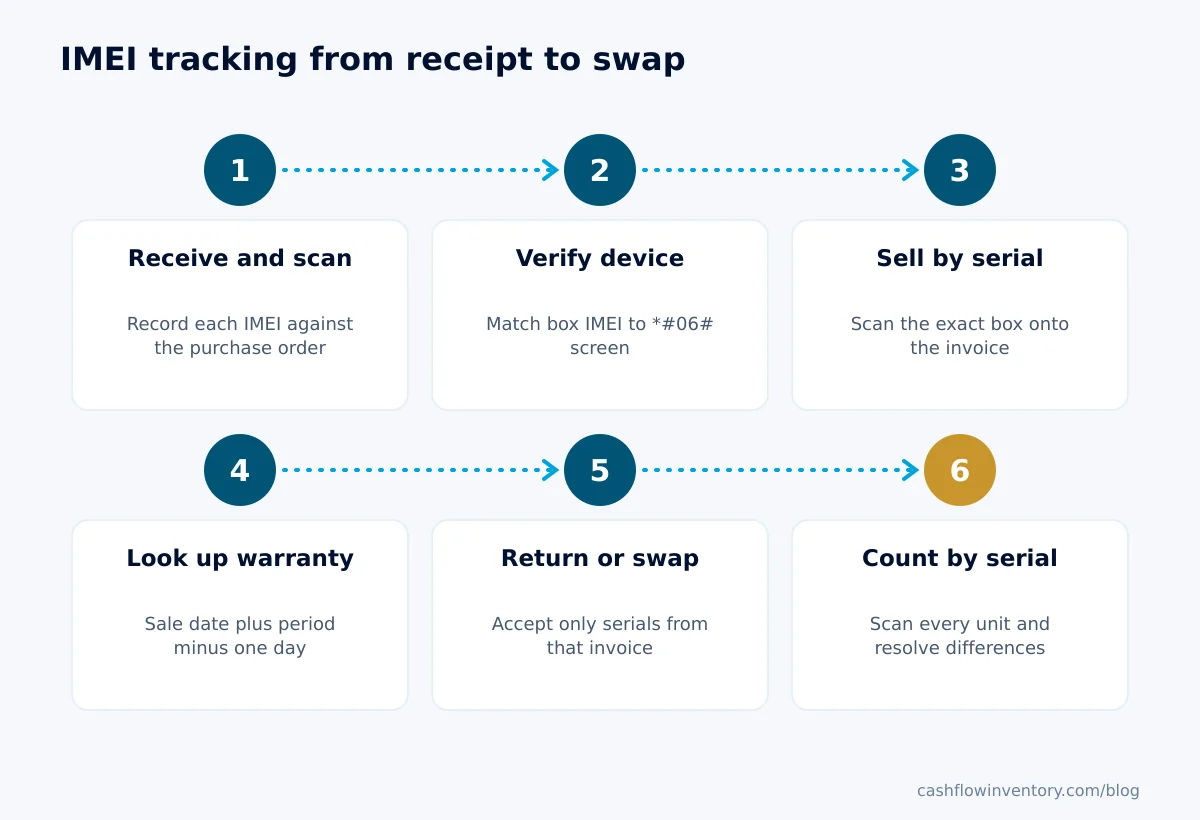
- Receive against the purchase order and capture each serial. Scan the IMEI barcode on each box as it comes in. For dual-SIM phones, decide which IMEI is your primary key (usually IMEI 1) and record the second in notes if your setup allows.
- Verify a sample against the device. For a share of each delivery, power on the phone and dial *#06#. Confirm the IMEI on screen matches the box label. A mismatch means a repacked or swapped unit, and the supplier should hear about it the same day.
- Shelve so the serial is visible. Keep the IMEI label facing out, so staff scan the box they are actually handing over rather than the first one in the drawer.
- Sell with the serial on the invoice. Scan the box at the point of sale so the exact serial is recorded against the customer. Name the customer for phones, even at the counter. Walk-in sales make warranty look-ups harder.
- Look up warranty by serial. When a device comes back, read its IMEI from the device itself (not the box), find the invoice, and apply your warranty end date rule.
- Return or swap against the original invoice. Accept only the serial that left on that invoice. Record the reason and condition, then either restock the unit, or set it aside as faulty and issue a replacement serial.
- Count by serial monthly. Scan every serialised unit on hand and resolve each difference by serial, not just by total.
Copy-ready counter checklist for a phone return or warranty claim
- IMEI read from the device (*#06# or Settings), not just from the box.
- IMEI matches a serial that left on one of our invoices.
- Invoice found; customer name matches, or the receipt is presented.
- Sale date noted; warranty end date worked out with the shop rule.
- Inside the return window? Box, accessories and seals checked and listed.
- Fault described in the customer’s words; physical or liquid damage noted.
- Photos of the device, the screen showing the IMEI, and any damage taken and attached to the return.
- Outcome chosen: refund, credit, swap, repair via manufacturer, or paid repair.
- If swapped: the replacement IMEI recorded on the new sale, and the faulty unit set aside as not sellable.
- Customer given a receipt showing both IMEIs and the new warranty end date, if your policy restarts it.
Decision rules for returns and swaps
Write these down and give them to every person who works the counter. Most disputes come from staff improvising.
- Serial does not match any invoice: do not accept it as a return. It is not your unit, or it was sold by another shop.
- Serial matches, inside the return window, unused and complete: accept the return, restock as sellable, and refund or give credit per your policy.
- Serial matches, inside the warranty, fault confirmed, no physical or liquid damage: swap or send for warranty repair. Record the faulty unit as not sellable and start a supplier or manufacturer claim.
- Serial matches, inside the warranty, but with physical or liquid damage: warranty usually does not apply. Offer a paid repair and record it as a separate service sale.
- Serial matches, outside the warranty: paid repair or nothing. Do not swap from stock as a favour without recording it as a discount or goodwill credit.
- Customer wants a different, pricier model: handle it as a return plus a new sale, with the credit used towards the new phone and the difference paid.
For the wider policy side, such as return windows, restocking and how returns affect margin, see our guide to returns management.
Common IMEI tracking mistakes
- Capturing the serial only at sale. Then you cannot tell whether a returned unit was ever in your stock, and you cannot match supplier claims to the purchase order.
- Typing IMEIs by hand. A 15-digit number typed under pressure will be wrong sooner or later. The check digit catches many typos but not all of them. Scan every time.
- Trusting the box over the device. A returned box can hold a different phone. Always read the IMEI from the device.
- Selling the “next” box rather than scanning the one handed over. The invoice then carries a serial still on your shelf, and the counts drift apart.
- Handing over a replacement without a sale record. Stock falls by one with no trace, and the replacement unit has no warranty start date in your system.
- Restocking a faulty unit as sellable. It gets sold again, comes back again, and costs you a customer.
- Counting by quantity only. As the worked example shows, the total can match while the units are wrong.
Edge cases generic answers skip
Dual-SIM phones and eSIM
Dual-SIM phones have two IMEIs. Pick one as the identifier you track (normally IMEI 1, the one printed first on the box) and apply it consistently, otherwise a look-up by the second number finds nothing. Phones with eSIM also carry an EID, a separate identifier for the embedded SIM. Note it if your market requires it, but do not use it in place of the IMEI.
Manufacturer replacements with a new IMEI
When a brand service centre replaces a device or its main board, the customer may get back a unit with a different IMEI. Record the new IMEI against the original sale in your notes or attachments. Otherwise the next warranty look-up fails, and the customer is told their phone was never sold by you.
Used and trade-in phones
For second-hand stock, check the IMEI against the national blocking system before buying. Examples are the PTA DIRBS device registration system in Pakistan and India’s Sanchar Saathi portal, which includes the central equipment identity register. Then receive the phone with its serial exactly like new stock, and apply your own shop warranty period rather than the manufacturer’s.
Bundles and accessories
Chargers, cases and screen protectors are tracked by quantity, not serial. When a phone sold in a bundle comes back, return the phone by serial and the accessories by quantity, each on its own invoice line.
Phones sold online and shipped
The serial must be scanned when the parcel is packed, not when the order is placed. If the parcel comes back undelivered, receive it back against the same serial. Our couriers and shipping guide covers parcels that come back.
How to do this in Cash Flow Inventory
Cash Flow Inventory tracks serial numbers through receiving, the sale and the return. Here is the procedure, using the screens as they are named in the app.
1. Set up and receive with serial numbers
If you are new, start with the getting started guide to set up your business and bring in your products. Then receive each delivery against its approved purchase order, in full or in part, and enter the serial number (IMEI) of each unit as you receive it. The supplier’s bill is made for you. The receiving goods guide walks through receiving with lots and serial numbers, including landed costs.
2. Sell at the counter
Open Sales › Point of sale, choose Open shift and enter the opening float. Pick the customer rather than leaving the walk-in customer, so the phone is linked to a name for warranty look-ups. Scan the product, choose Take payment, and enter each method used: cash, card, gift card or mobile wallet. Each sale records the order, the goods out, an approved invoice and the payment in one step. The point of sale page has an overview.
3. Take a return or a swap
- At the till, use Return goods from an earlier receipt (F8). It finds the receipt by its barcode or among the customer’s recent invoices, and shows what is left to return. In the back office, open Sales › Invoices and choose Return… on the invoice.
- Enter the quantity coming back, with the reason and condition.
- Choose the serial number coming back. For tracked items, only the lots and serial numbers that left on that invoice’s pick are offered. That is your built-in check that the returned phone is the one you sold.
- Save. The goods are back in stock and the return waits for approval. If your shop keeps a separate location for faulty units, transfer the faulty phone there so it is not sold again.
- Approve the return. The credit note is made.
- Refund it from the Refunds tab, or keep it as the customer’s credit.
For a swap at the till, the return credit can go towards the new sale in the same checkout. You scan the replacement phone, the credit covers it, and the customer pays any difference. Till options set the return window in days, the return reasons, and a manager PIN above an amount. For a goodwill gesture with no phone coming back, use Credit note (no goods back)… on the approved invoice. Full details are in the sales returns, credit notes and refunds guide.
4. Keep the evidence
Attach the photos from your checklist, such as the device screen showing the IMEI and any damage, to the return. Every file attached to a return, order or bill appears in one searchable list. The documents guide explains how to find it later when a supplier disputes a claim.
On the books, a saved return posts Dr Inventory / Cr Cost of Goods Sold at the cost the goods left at. The approved credit note posts Dr Sales Returns / Cr Accounts Receivable, with the tax. Your stock value and margin stay correct through every swap.
Frequently asked questions
What is the difference between an IMEI and a serial number?
An IMEI identifies a device on mobile networks and is used by carriers and blocking registers. A serial number is the manufacturer’s own identifier and exists on non-cellular devices too. For stock tracking, use the IMEI for phones and the serial number for everything else, one identifier per unit.
Do I need IMEI tracking software, or is a spreadsheet enough?
A spreadsheet works for a few units a week if one disciplined person keeps it. It breaks when several staff sell, when returns must be matched to the exact invoice, or when stock and accounts need to agree. Software that records the serial on receipt, sale and return removes the manual matching.
How do I check if a phone is still under warranty?
Read the IMEI from the device, find the invoice that carries it, and apply your rule: sale date plus the warranty period, minus one day. For manufacturer warranty, the brand’s service centre may also check by IMEI. Your invoice date is the customer’s proof of purchase.
Should a warranty swap restart the warranty?
That is a policy choice for your shop warranty. For manufacturer cover, follow the manufacturer’s terms. Whatever you decide, write it on the swap receipt next to the new IMEI, so the next look-up gives the same answer.
What do I do with a faulty phone after a swap?
Keep it out of sellable stock and record it as held for a supplier or manufacturer claim, with its serial, fault description and photos. Chase the claim monthly. In the worked example above, two units worth 360 at cost were waiting on the distributor.
How often should a phone shop count stock by IMEI?
At least monthly for the full range, and weekly for high-value models or any model with a recent discrepancy. Scan each unit, so the count compares serials rather than totals.
Recording the IMEI at receipt, at sale and at every return is what turns warranty claims and swaps from arguments into a two-minute look-up. If you want receiving, the till and returns to share one serial record, start a free trial and run your next delivery through it.