How to Set Delivery Charges for an Online Store Without Losing Money
Your courier's rate card is not your delivery cost. This guide shows how to price delivery by zone so that returns, COD fees and free-delivery offers stop eating your margin.
On this page
- Key takeaways
- What delivery really costs you: the true cost formula
- Worked example: delivery charges by zone and weight
- How to set delivery charges, step by step
- How to set a free delivery threshold that pays for itself
- Edge cases that break average delivery charges
- Bulky, light products
- Fragile goods
- Split shipments
- Exchanges and customer-initiated returns
- Marketplace and dropship orders
- Remote areas and islands
- Common mistakes when setting delivery charges
- Monthly delivery charge review checklist
- How to do this in Cash Flow Inventory
- Frequently asked questions
- Should I charge customers the exact courier rate for delivery?
- Is it better to offer free delivery or a flat delivery fee?
- How do I calculate a free shipping threshold?
- How do returns affect delivery charges?
- How often should I review my delivery charges?
- Should delivery charges be different for heavier orders?
To set delivery charges without losing money, work out the true cost of each delivered order in each zone: the courier’s rate for the parcel’s weight, plus packaging and cash-on-delivery fees, plus your return rate multiplied by what a failed delivery costs you. Then charge at least that amount, or recover the gap through your product price or a free-delivery threshold set from your gross margin.
Most online shops lose money on delivery for one reason. They copy the courier’s rate card onto their checkout. That card shows what one successful parcel costs, but it leaves out refused parcels, return charges, COD fees and packaging.
On this page you get the formula with every part explained, a worked example for a three-zone shop with all the numbers shown, a step-by-step method and a free-delivery threshold rule. It also covers the edge cases that generic answers skip and a monthly review checklist. The last section shows how to set this up in Cash Flow Inventory.
Key takeaways
- The courier’s rate card is your starting point, not your delivery cost. Returns, COD fees and packaging often add a large share on top of it.
- Divide your total delivery spend by delivered orders, not shipped orders. Refused parcels earn you no delivery fee, but you still pay for them.
- Price each zone separately. Zones with high return rates cost far more per delivered order than their base rate suggests.
- Set a free-delivery threshold so the extra gross profit from a bigger basket covers the delivery you absorb. A round number your customers can remember works best.
- Compare what you charged with what the courier billed, every month, parcel by parcel.
What delivery really costs you: the true cost formula
A courier invoices you for every parcel it carries, whether the customer accepts it or not. You only collect a delivery fee from customers who accept. So the cost you need to recover has to be spread over delivered orders only.
True delivery cost per delivered order = (shipped orders × (courier rate + packaging) + returned orders × (return charge + repack cost) + delivered orders × COD fee) ÷ delivered orders
Here is what each part means:
- Courier rate: the outbound charge for that zone and weight band, taken from your courier’s rate card or a live quote. Public carriers such as Royal Mail and USPS publish their prices. Local couriers such as Steadfast show yours in your merchant panel.
- Packaging: box or mailer, filler, tape and label for one parcel.
- Return charge: what the courier bills to bring a refused or undeliverable parcel back. Many couriers charge a share of the outbound rate, so check your contract.
- Repack cost: new packaging, damaged items you can’t resell, and staff time to check and restock the goods.
- COD fee: the courier’s charge for collecting cash, usually a percentage of the amount collected. You only pay it on delivered parcels.
If you sell prepaid only, the COD part drops out, but returns rarely do. For the accounting side of each charge, see how to record courier delivery charges and COD fees in your books.
Worked example: delivery charges by zone and weight
Example: a shop selling handmade soaps and skincare online (a hypothetical business; amounts in Tk, but the method works in any currency). A typical order weighs up to 1 kg and the customer pays about Tk 1,000 for the products. The courier charges a COD fee of 1%, which comes to Tk 10 per delivered parcel. Packaging costs Tk 20 per parcel, and repacking a returned parcel costs Tk 10.
The shop ships to three zones and currently charges customers Tk 70, Tk 120 and Tk 150. Here is what 100 shipped orders in each zone really cost.
| Line | Zone 1: same city | Zone 2: suburbs | Zone 3: rest of country |
|---|---|---|---|
| Courier rate, up to 1 kg | Tk 60 | Tk 100 | Tk 130 |
| Packaging per parcel | Tk 20 | Tk 20 | Tk 20 |
| Return rate | 4% | 10% | 20% |
| Cost per return (return charge + Tk 10 repack) | Tk 40 (30 + 10) | Tk 60 (50 + 10) | Tk 70 (60 + 10) |
| Outbound + packaging, 100 parcels | Tk 8,000 | Tk 12,000 | Tk 15,000 |
| Returns cost | 4 × 40 = Tk 160 | 10 × 60 = Tk 600 | 20 × 70 = Tk 1,400 |
| COD fees on delivered parcels | 96 × 10 = Tk 960 | 90 × 10 = Tk 900 | 80 × 10 = Tk 800 |
| Total delivery cost | Tk 9,120 | Tk 13,500 | Tk 17,200 |
| Delivered orders | 96 | 90 | 80 |
| True cost per delivered order | Tk 95 | Tk 150 | Tk 215 |
| Current charge to customer | Tk 70 | Tk 120 | Tk 150 |
| Loss per delivered order | Tk 25 | Tk 30 | Tk 65 |
| Loss per 100 shipped orders | Tk 2,400 | Tk 2,700 | Tk 5,200 |
The shop thought it was charging slightly above the courier’s rate in every zone. In fact it loses Tk 10,300 on every 300 orders shipped (2,400 + 2,700 + 5,200). Zone 3 alone accounts for half of that loss, because one parcel in five comes back.
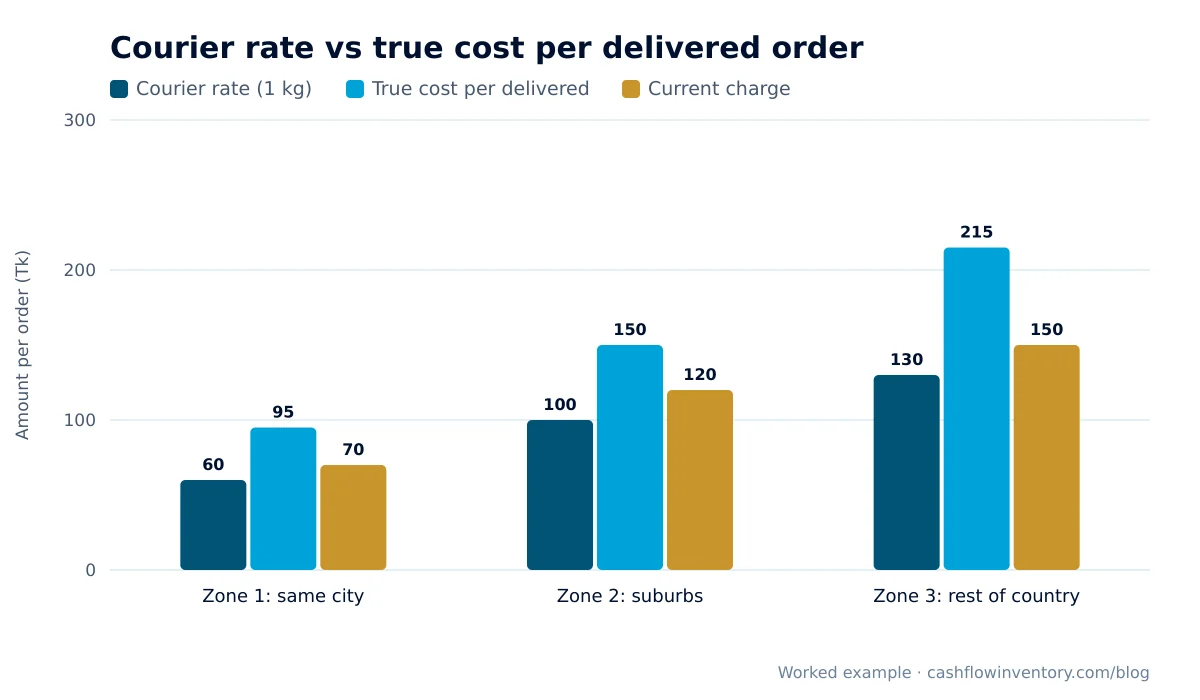
The gap between the rate card and the true cost grows with the return rate. In Zone 1 the true cost is about 1.6 times the courier rate (95 ÷ 60). In Zone 3 it is about 1.65 times (215 ÷ 130), and the amount lost per order is more than twice as large.
Weight matters too. Suppose this courier adds Tk 15, Tk 20 and Tk 25 per extra kilogram in the three zones. Then a 2 kg order costs that much more for every parcel shipped, including the ones that come back. Spread over delivered orders, the extra in Zone 3 is Tk 25 × 100 ÷ 80 = Tk 31.25, not Tk 25.
How to set delivery charges, step by step
- List your zones the way your courier prices them. Use the courier’s own zone names, such as same city, suburbs and national, or postcode bands. Don’t invent your own.
- Find your real weight bands. Weigh 20 typical packed orders. Note how many cross the first weight break, and whether any bulky item is charged by volume.
- Pull three months of parcel data per zone. For each zone, count shipped parcels, delivered parcels and returns, and total the courier’s actual bills, including return charges and COD fees.
- Calculate the true cost per delivered order with the formula above, zone by zone.
- Decide how much you will absorb. You can charge the full true cost. You can absorb part of it in the product price, if your gross margin allows. Or you can charge a flat fee and recover the rest through a threshold.
- Round to customer-friendly numbers. In the example, Tk 95, Tk 150 and Tk 215 could become Tk 100, Tk 150 and Tk 220.
- Add a weight rule. For example, add the per-kg surcharge divided by the zone’s delivery rate for each kilogram above the first band.
- Review monthly. Return rates move with seasons, campaigns and product mix, and your charges should follow.
Tip from practice: In a zone with a high refusal rate, ask for the delivery fee in advance, for example by mobile wallet, and let the courier collect the rest. A customer who has paid the fee is far less likely to refuse the parcel. If the parcel does come back, you have already covered the outbound charge. For more tactics, see how to reduce fake COD orders and returns.
How to set a free delivery threshold that pays for itself
Free delivery is not free. You pay the true cost per delivered order, and the threshold has to make the basket big enough to cover it. The rule is simple: an order that ships free should earn at least as much gross profit as your average order does when the customer pays for delivery.
Free delivery threshold = (gross profit on your average order + true delivery cost) ÷ gross margin %
In the example, say the shop’s gross margin is 50%. An average Tk 1,000 basket then earns Tk 500 of gross profit, and the threshold works out as follows:
- Zone 1 only: (500 + 95) ÷ 0.50 = Tk 1,190.
- Zone 3 only: (500 + 215) ÷ 0.50 = Tk 1,430.
- One threshold for the whole country: suppose half of delivered orders go to Zone 1, a fifth to Zone 2 and the rest to Zone 3. The weighted cost is 0.5 × 95 + 0.2 × 150 + 0.3 × 215 = 47.5 + 30 + 64.5 = Tk 142. That gives (500 + 142) ÷ 0.50 = Tk 1,284, which rounds up to Tk 1,300.
Some rules keep the threshold honest:
- Set the threshold at least 20–30% above your current average order. If it is too close, most orders qualify without adding anything, and you simply give away delivery.
- Round up, never down.
- If one zone is much more expensive, offer free delivery only in the cheaper zones, or set a higher threshold for the expensive one.
- Check that bigger baskets don’t push parcels into a heavier weight band. If they do, add the surcharge to the cost before you divide.
- Once the threshold is live, watch the return rate on free-delivery orders. A customer who paid nothing for delivery loses nothing by refusing the parcel.
Edge cases that break average delivery charges
Bulky, light products
Pillows, lampshades and boxed gift sets can be charged by volumetric weight: length × width × height divided by a factor the courier sets. Measure the packed parcel, not the product. A flat fee based on actual weight will undercharge these every time.
Fragile goods
Glass jars and ceramics need more packaging and get damaged more often. Add the extra packaging cost and an allowance for breakage to the repack line, or price these items with their own delivery fee.
Split shipments
If an order ships in two parcels because one item was out of stock, you pay two courier charges for one delivery fee. Either hold the order until it can ship complete, or count split parcels in your cost data. Accurate stock levels prevent most splits.
Exchanges and customer-initiated returns
A size exchange can mean three courier legs: out, back and out again. Decide in your returns policy who pays which leg. Our guide to returns management covers how to write that policy.
Marketplace and dropship orders
Marketplaces often set or subsidise delivery fees themselves, and dropship suppliers bill shipping inside the product cost. Keep these orders out of your own zone calculation, or they will distort your averages.
Remote areas and islands
Many couriers add a remote-area surcharge to certain postcodes. If these destinations sit in a general national zone, one remote order can wipe out the margin of several normal ones. Give them their own line.
Common mistakes when setting delivery charges
- Copying the courier’s rate card. This is the most common mistake. As the example shows, it can leave you short in every zone.
- Dividing by shipped orders. This hides the cost of refused parcels, which are worst in COD-heavy zones.
- One flat national fee with no threshold logic. Your cheap zones end up subsidising your expensive ones, and you rarely notice which is which.
- Ignoring the COD fee because it is “only 1%”. It is charged on every delivered parcel, and on large baskets it is bigger than the packaging cost.
- Setting a free-delivery threshold from competitors. Their margins, couriers and return rates are not yours.
- Never checking the courier’s bill against what you charged. Wrong weight bands and surcharges pile up quietly.
- Booking delivery losses as general overhead. Keep courier charges in their own account so the loss stays visible. Our guide to cash on delivery accounting shows the journal entries.
Monthly delivery charge review checklist
- Shipped, delivered and returned parcels per zone for the month.
- Total courier bills per zone, including return charges, COD fees and surcharges.
- True cost per delivered order per zone, recalculated with the formula.
- Gap between what you charged and what it cost, per zone.
- Parcels billed in a heavier weight band than expected, with the reason.
- Return rate on free-delivery orders compared with paid-delivery orders.
- Average order value compared with the free-delivery threshold.
- Decision: keep, raise or lower each zone’s charge, and the date the change goes live.
How to do this in Cash Flow Inventory
Cash Flow Inventory keeps your shipping rates, the courier’s real charges and your COD cash in one place. That way the comparison in the example builds up from real parcels instead of a spreadsheet. Here is the procedure:
- Connect your couriers. Under Integrations, in the Shipping & delivery group, add each carrier using the keys from your courier’s merchant panel. Paste the webhook address and secret shown there into the courier’s portal, so status changes arrive within seconds.
- Set zones and rate cards. In Settings › Shipping, set your shipping methods, zones and rate cards, and choose How the carrier is chosen: people choose, suggest one and people confirm, or choose automatically.
- Give products a weight, and sizes where a carrier prices by volume, so rates match the real parcel.
- Compare before you book. In Sales › Ship & delivery, choose Compare shipping rates in a delivery’s row menu. It shows your rate cards and live quotes, cheapest first, with the cheapest and fastest marked.
- Record the courier’s real charge. In Settings › Sales › Approvals › Cash-on-delivery parcels, choose Record the courier’s delivery charge as a bill, settled from the cash collected. When a parcel is delivered with exactly the amount booked, the app approves the invoice, records the receipt and puts the courier’s real charge on its bill by itself.
- Catch the returns. Parcels that don’t match go to Approvals › Delivered parcels (COD), where you can mark one returned, with a reason. This gives you the return counts you need for each zone.
- Check your price against the courier’s charge. Open Integrations › the courier’s page › Reconcile parcels. It lists every parcel: due, booked, collected, the courier’s status, and your price against the courier’s charge. This is your monthly gap check.
- Settle payouts. When the courier pays out, paste the payout statement into Accounting › Courier remittances, check the amount that should reach the bank, and choose Post a settlement.
If you take the delivery fee in advance, Cash Flow Inventory holds it as a customer advance and applies it when the invoice is made. The courier then collects only the rest. To run a free-delivery threshold, create a free shipping offer as described in the promotions and discounts guide.
Full detail is in the couriers and shipping guide and the cash on delivery settlement guide.
Frequently asked questions
Should I charge customers the exact courier rate for delivery?
No. The courier rate covers one successful outbound parcel only. Add packaging, COD fees and the cost of returns, then divide by delivered orders. Charge that amount, or deliberately absorb part of it in your product price.
Is it better to offer free delivery or a flat delivery fee?
Free delivery works when your gross margin can absorb the true delivery cost on a bigger basket. A flat fee is safer when margins are thin or return rates are high. Many shops combine the two: a flat fee per zone below a threshold, and free delivery above it.
How do I calculate a free shipping threshold?
Add the gross profit on your average order to your true delivery cost per delivered order, then divide by your gross margin percentage. Round the result up to a number your customers can remember. If your zones differ a lot, use a weighted cost or set a threshold per zone.
How do returns affect delivery charges?
Every returned parcel costs you the outbound charge, a return charge and repacking, and it earns no delivery fee. That is why the cost per delivered order rises sharply in zones with high refusal rates. Cutting refusals, for example with advance delivery fees, can lower your true cost more than negotiating the courier’s rates.
How often should I review my delivery charges?
Review them monthly, and whenever your courier changes its rate card or you add bulky or fragile products. Return rates also shift around sales campaigns and festive seasons, so check them after every big promotion.
Should delivery charges be different for heavier orders?
Yes, if your courier prices by weight or volume. Add the courier’s per-kilogram surcharge, spread over delivered orders, for each band above the first. Otherwise heavy orders will be subsidised by light ones.
Delivery charges are a pricing decision, not an admin setting. Once you see the true cost per delivered order in each zone, the right fee and threshold usually follow quickly. To track rate cards, courier bills, returns and COD cash in one place, start a free trial of Cash Flow Inventory.