Pharmacy Batch and Expiry Tracking: FEFO Step by Step
A practical FEFO playbook for pharmacies: record batch and expiry at receipt, sell soonest-expiry first, find stock at risk with a simple formula, and return it while the supplier still gives credit.
On this page
- Key takeaways
- What FEFO means in a pharmacy, and why FIFO is not enough
- The near-expiry formula: units and value at risk
- Worked example: a near-expiry list for a small pharmacy
- FEFO step by step: from delivery to supplier return
- Decision rules for near-expiry stock
- Weekly near-expiry checklist (copy and use)
- Common pharmacy expiry tracking mistakes
- Edge cases generic answers skip
- Expiry printed as month and year
- Loose strips and split packs
- Bonus and free goods
- Short-dated deliveries
- Customer returns
- Recalls
- How to do this in Cash Flow Inventory
- One-time setup
- Receiving with batch and expiry
- Selling FEFO, the near-expiry list and returns
- Frequently asked questions
- What is the difference between FEFO and FIFO in a pharmacy?
- How often should a pharmacy check expiry dates?
- How many days before expiry should you stop selling a medicine?
- Can I return near-expiry medicines to my supplier?
- What should I do with expired medicines in stock?
Pharmacy expiry tracking means recording the batch (lot) number and expiry date of every pack when it arrives, then always selling the lot that expires soonest first. This is called first-expiry-first-out, or FEFO. To make it work, add a weekly near-expiry review that returns, moves or marks down slow lots while your supplier will still give credit. That review is what turns expiry losses from a surprise into a small, planned number.
This page gives you the full routine. You get a simple formula for the units and value at risk in each lot, and a worked near-expiry list for a hypothetical pharmacy with every figure checked. There are also decision rules for what to do with each lot, a copy-ready weekly checklist, and the edge cases that generic advice skips.
The last section shows how to run the same process in Cash Flow Inventory, from receiving lots to writing off expired stock.
Key takeaways
- Capture the batch number and expiry date at the moment of receipt. Stock without an expiry date on record cannot be managed by expiry.
- FEFO beats FIFO in a pharmacy, because a later delivery can carry an earlier expiry date.
- Units at risk = units in the lot − expected sales before your stop-sale date. Run this for every lot that expires within your review window.
- Act on at-risk stock in a fixed order: return to the supplier while the return window is open, then move it to another branch, then mark it down, then write it off.
- Quarantine expired stock the day it expires. Write it off and dispose of it under your local rules, and never put it back on the shelf.
What FEFO means in a pharmacy, and why FIFO is not enough
FIFO (first in, first out) sells the oldest delivery first. That works when every delivery carries a later expiry than the one before. Wholesalers do not guarantee this. A distributor clearing its own short-dated stock can send you a lot today that expires before the one already on your shelf.
FEFO looks only at the expiry date. Whichever lot expires first is picked first, whatever day it arrived. For medicines, that is the rule that protects patients and your margin, because a pack that expires on the shelf earns nothing and has to be destroyed.
FEFO depends on one thing: you know the expiry of every lot you hold. That means expiry is captured at receipt, not discovered at the shelf. If you are new to lot records in general, our guide to lot tracking across the supply chain covers the basics.
The near-expiry formula: units and value at risk
A list of lots that “expire soon” is not enough on its own. A fast seller expiring in 60 days is fine, while a slow seller expiring in 150 days may already be a problem. The formula below tells you which lots will not sell in time.
Sellable days = days to expiry − stop-sale buffer
Expected sales of the lot = average daily sales × (sellable days − days taken by earlier-expiring lots)
Units at risk = units in the lot − expected sales of the lot (zero if negative)
Value at risk = units at risk × unit cost
Here is what each part means:
- Days to expiry: the days from today to the expiry date printed on the pack.
- Stop-sale buffer: how many days before expiry you stop selling. A customer needs time to use the product, so many pharmacies do not sell a pack that would expire during a normal course of use. Set one buffer for the shop (30 days is common) and a longer one for items used over months.
- Average daily sales: units sold over the last 90 days ÷ 90. Use your sales history, not a guess.
- Days taken by earlier-expiring lots: under FEFO, older-dated lots of the same item sell first. Each earlier lot takes the smaller of (its units ÷ average daily sales) or its own sellable days.
- Unit cost: what you paid per unit. This shows how much money is at stake.
Round expected sales down. If the result says 13.5 units will sell, plan for 13.
Worked example: a near-expiry list for a small pharmacy
Example: a shop selling prescription and over-the-counter medicines. Greenleaf Pharmacy is hypothetical. It runs its near-expiry review every Monday and looks at every lot expiring within 180 days. Its settings are:
- A stop-sale buffer of 30 days.
- A wholesaler that gives full credit on unopened packs returned at least 90 days before expiry, and no credit after that.
Amounts are in dollars, but the method works in any currency.
| Item | Lot | Units | Days to expiry | Avg daily sales | Sellable days | Days taken by earlier lots | Expected sales | Units at risk | Unit cost | Value at risk | Action |
|---|---|---|---|---|---|---|---|---|---|---|---|
| Cough syrup 100 ml | CS-2231 | 40 | 70 | 6 | 40 | 0 | 40 (240 possible) | 0 | 2.40 | 0.00 | Keep selling FEFO |
| Eye drops 10 ml | ED-118 | 30 | 110 | 0.2 | 80 | 0 | 16 | 14 | 3.20 | 44.80 | Return 14 to supplier now |
| Antifungal cream 30 g | AF-552 | 24 | 75 | 0.3 | 45 | 0 | 13 | 11 | 1.90 | 20.90 | Offer to branch, mark down, plan write-off |
| Vitamin D 1000 IU tablets | VD-871 | 20 | 40 | 0.5 | 10 | 0 | 5 | 15 | 2.00 | 30.00 | Mark down now, write off rest at stop-sale |
| Vitamin D 1000 IU tablets | VD-904 | 60 | 160 | 0.5 | 130 | 10 | 60 | 0 | 2.00 | 0.00 | Keep selling FEFO |
| Total | 174 | 40 | 95.70 |
How the numbers work:
- Eye drops: 110 − 30 = 80 sellable days. At 0.2 a day, 80 × 0.2 = 16 units will sell, so 30 − 16 = 14 units are at risk. At 3.20 each, that is 14 × 3.20 = 44.80. The lot has 110 days to expiry, which is more than the 90-day return limit, so Greenleaf returns 14 units for full credit and keeps 16 to sell.
- Antifungal cream: 75 − 30 = 45 sellable days. At 0.3 a day, 45 × 0.3 = 13.5, rounded down to 13. That leaves 24 − 13 = 11 units at risk, or 11 × 1.90 = 20.90. With 75 days left, the return window has closed.
- Vitamin D lot VD-871: only 40 − 30 = 10 sellable days. At 0.5 a day it sells 5 units, leaving 15 at risk, or 15 × 2.00 = 30.00.
- Vitamin D lot VD-904: FEFO sells VD-871 first. That lot takes the smaller of 20 ÷ 0.5 = 40 days or its 10 sellable days, so 10 days. VD-904 then has 130 − 10 = 120 days, and 120 × 0.5 = 60 units. Its full 60 units should sell, so nothing is at risk.
Totals: 14 + 11 + 15 = 40 units at risk, with a value of 44.80 + 20.90 + 30.00 = 95.70. The supplier return recovers 44.80. That leaves 95.70 − 44.80 = 50.90 to protect through branch transfers and markdowns.
Note the cough syrup. It expires soonest of the four items but has no problem, because it sells fast. A list sorted only by date would have flagged it first and missed the eye drops.
FEFO step by step: from delivery to supplier return
The procedure has six stages. Each one feeds the next, so a gap at receipt shows up later as a loss at write-off.
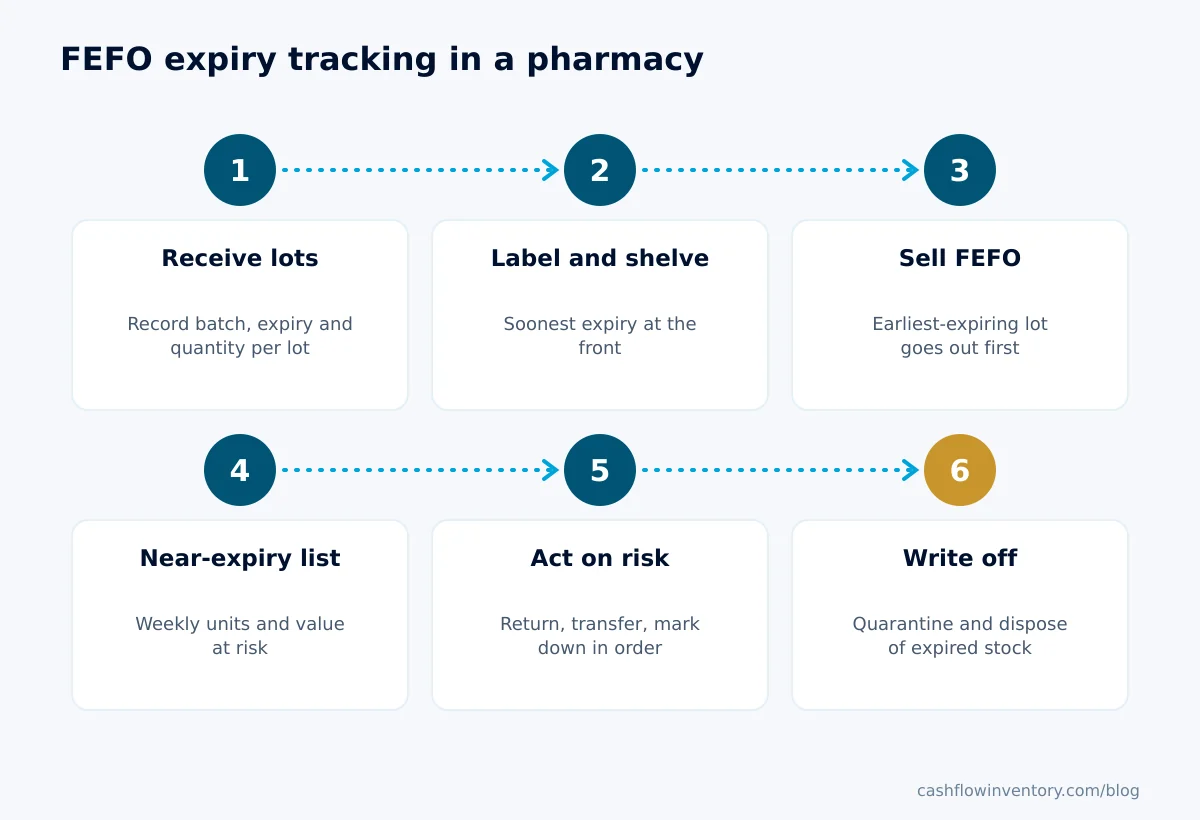
- Receive with batch and expiry. Check each line of the delivery against the purchase order. For every lot, record the batch number, the expiry date and the quantity. If one line arrives in two lots, record two lots. Reject or query any delivery below your minimum remaining shelf life, for example 6 months for most lines and 12 months for slow movers.
- Label and shelve in expiry order. Put the soonest-expiry lot at the front of the shelf and newer-dated lots behind it. If packs are hard to read, print shelf or pack labels showing the lot and expiry.
- Sell first-expiry-first-out. At the counter, pick the front pack. When you dispense from stock, record which lot went out, so a recall can reach the right customers.
- Run the near-expiry list weekly. Pull every lot expiring within your window (180 days works for most pharmacies). Apply the formula above and sort by value at risk, not by date.
- Act on every at-risk lot. Follow the decision rules below and record each action: the return, the transfer, the markdown or the write-off.
- Quarantine and write off expired stock. On the expiry date, remove remaining packs to a marked quarantine area. Write them off in your stock records and dispose of them as your regulator requires.
Decision rules for near-expiry stock
Work through these in order for each lot with units at risk:
- Return window still open? Return the at-risk units, not the whole lot. Keep what will sell, and get the supplier credit recorded against their bill.
- Window closed, but another branch sells it faster? Transfer the stock there, as long as the other branch can sell it before its stop-sale date.
- Over-the-counter item and a markdown is allowed locally? Mark it down early, while there is still time to sell. A small discount at 60 days recovers more than a large one at 31 days.
- Nothing works? Plan the write-off, and stop reordering that item until the next lot is due.
- The same item appears on the list three weeks running? Cut its order quantity. Expiry losses on slow movers usually start with buying too much at once, not with poor shelf rotation.
Weekly near-expiry checklist (copy and use)
- Pull all lots expiring within 180 days, by location.
- Update average daily sales from the last 90 days.
- Calculate sellable days, expected sales and units at risk for each lot.
- Sort by value at risk, highest first.
- Check each supplier’s return terms and the days left before each return cut-off.
- Raise supplier returns for every lot still inside its window.
- Offer remaining at-risk stock to other branches.
- Agree markdowns for permitted over-the-counter lines.
- Spot-check five shelves to confirm the soonest-expiry pack is at the front.
- Move any expired packs to quarantine and record the write-off.
- Note repeat offenders and reduce their next order quantity.
Common pharmacy expiry tracking mistakes
- Recording expiry only on the shelf, not in the system. Shelf stickers fall off, and nobody can search them. If the expiry is not in your stock records, you cannot run the near-expiry list.
- Sorting the review by date alone. As the worked example shows, the soonest-expiring lot is often the safest one. Sort by value at risk.
- Returning the whole lot. Return only the units at risk. Sending back stock you would have sold costs you margin and annoys the supplier.
- Missing the return window by a week. Supplier return limits are counted in days to expiry. Track the cut-off date for each lot, not just the expiry date.
- Buying deep to win a bulk discount on a slow line. The discount disappears if a third of the stock expires. Set order sizes from real sales; our guide to automatic inventory replenishment and the reorder point calculator help you size orders to demand.
- Leaving expired packs mixed with good stock “until the count”. Quarantine them the same day. A pack sold one day past expiry is a patient safety problem, not just a stock problem.
Edge cases generic answers skip
Expiry printed as month and year
Many packs show only “EXP 03/YY”. Unless the manufacturer says otherwise, treat that as the last day of the month, and apply the same rule at every receipt so your dates are consistent. Write the rule into your receiving procedure, so that one staff member does not use the 1st while another uses the 31st.
Loose strips and split packs
When you sell single strips from a box, the loose strips keep the box’s lot and expiry. Keep each opened box together, or label the strips, so the lot is never lost.
Bonus and free goods
Schemes such as “buy 10, get 2 free” are common with distributors in South Asia and the Gulf. The free units have expiry dates too, and they often arrive in a different lot from the paid units. Record them as their own lot lines. Ask before accepting short-dated bonus stock, because a free pack that expires still costs you shelf space and disposal.
Short-dated deliveries
Agree a minimum remaining shelf life with each supplier in writing, and refuse or query anything below it at the door. A supplier is far easier to deal with before you sign for the delivery than after. Our article on supplier negotiation covers how to build return terms and shelf-life minimums into your agreements.
Customer returns
Many regulators restrict or forbid returning dispensed medicines to stock. Check the rules for your country before you accept a customer return of a medicine to saleable stock. In the UK, for example, the General Pharmaceutical Council sets the standards for registered pharmacies.
Recalls
A lot recall is where batch records prove their worth. If you know which customers and which branches received a lot, you can contact them the same day. Follow the notices from your regulator: in the UK that is the Medicines and Healthcare products Regulatory Agency, and in the US the FDA’s Drug Supply Chain Security Act pages describe product tracing duties for the drug supply chain.
Expert tip: Add a “return cut-off” column to your near-expiry list. It equals the expiry date minus the supplier’s return limit. Sort your returns by that date, not the expiry date. The money you can still recover sits in the lots whose cut-off is nearest.
How to do this in Cash Flow Inventory
Cash Flow Inventory records lots with their expiry at receipt, draws the soonest-expiring lot on every sale, and adds pharmacy reports through an industry pack. Here is the setup and the weekly routine.
One-time setup
- In Settings › Inventory, set Batch tracking to Yes. Under Expired batches, choose Block (an expired lot can’t be sold or used) or Warn, then allow. For medicines, Block is the safer choice.
- On each product with an expiry date, switch on Track batches & expiry.
- The owner opens Settings › Localization & packs and ticks on the Pharmacy & expiry-dated goods pack. It needs lot tracking switched on first, and the pack page tells you if it is missing. The pharmacy reports then appear in Reports.
Receiving with batch and expiry
- Open Purchasing › Purchase orders, find the order in To receive and choose Receive goods in its row menu.
- Enter the quantity that arrived on each line. For tracked items, enter the lot numbers with their expiry dates.
- Check the date and the location, then save. The stock is added and a draft supplier bill is made to match what was received.
- Use Print labels… in the receipt’s row menu if you want labels; these can print the lot and expiry.
Selling FEFO, the near-expiry list and returns
- Sell as usual, including at the counter through point of sale and the cash register. Sales draw the lot that expires soonest first, and a lot’s expiry shows wherever you choose one.
- Each week, open Expiry watch (Reports, Inventory group). It lists lots that expire soon or already have, with their value at cost. Use it as the input to the formula above.
- For lots inside the supplier’s return window, open the goods receipt and choose Return goods in its row menu. Then record the supplier’s credit against their bill, as described in the guide to purchase returns and supplier credits.
- For stock that has expired, use Inventory › Stock counts › Write off expired stock. It writes off every expired lot at a location in one step.
- If a recall arrives, the Lot recall report lists every customer who received a lot, with the documents and where the lot came from.
- To audit what happened to a lot, the stock movements log shows every receipt, sale, transfer and adjustment, with who made it and the document.
The full reference, including quality control for pharmacies that make their own preparations, is in the guide to batches, lots and quality control.
Frequently asked questions
What is the difference between FEFO and FIFO in a pharmacy?
FIFO sells the oldest delivery first, while FEFO sells the lot with the earliest expiry date first. They usually match, but not always, because a newer delivery can carry an earlier expiry. FEFO is the safer rule for medicines because it is based on the date that actually matters.
How often should a pharmacy check expiry dates?
Run a near-expiry review weekly from your stock records, covering every lot due to expire within about 180 days. Add a quick shelf spot-check of a few sections each week, and a full shelf check when you do stock counts. The weekly review matters most, because supplier return windows close on fixed dates.
How many days before expiry should you stop selling a medicine?
Many pharmacies stop sale around 30 days before expiry and use a longer buffer for products taken over several months. The right buffer is the time a customer needs to finish the product safely. Set a default for the shop and longer exceptions for specific items, and follow any rule set by your regulator.
Can I return near-expiry medicines to my supplier?
Often yes, if your agreement allows it and you return the stock before the supplier’s cut-off, which is usually a set number of days before expiry. Terms vary widely, so get them in writing for each supplier. Return only the units you will not sell in time, and make sure the credit is recorded against the supplier’s bill.
What should I do with expired medicines in stock?
Move them to a marked quarantine area the day they expire, so they cannot be sold by mistake. Write them off in your stock records so your stock value is correct. Then dispose of them through the route your local regulations require, and keep the disposal record.
FEFO is simple once batch and expiry are captured at every receipt, and the weekly near-expiry list turns that data into money you keep. If you want lots drawn soonest-expiry first, an expiry watch with value at cost and supplier returns in one place, see how Cash Flow Inventory pharmacy inventory software handles it.