How to Reduce Fake COD Orders and Returns: A Checklist for Online Sellers
A practical checklist to cut fake and refused cash-on-delivery orders. It includes a worked example that prices each control, a confirmation script and decision rules you can use today.
On this page
- Key takeaways
- What a fake or refused COD order really costs
- Four controls that reduce fake COD orders, and what each saves
- 1. Confirmation calls and messages before booking
- 2. Repeat-refuser lists
- 3. Partial advance on high-risk orders
- 4. Delivery-charge rules
- Worked example: the cost each COD control saves
- Checklist to reduce fake COD orders and returns
- Confirmation message template
- Confirmation call script
- Decision rules: confirm, ask for an advance or decline
- Common mistakes when cutting COD refusals
- Edge cases generic advice skips
- Rider marks the parcel refused without an attempt
- Partial acceptance
- Gifts and orders for someone else
- Sale periods and festivals
- Shared phone numbers
- Privacy rules for refuser lists
- How to do this in Cash Flow Inventory
- Frequently asked questions
- How do I stop fake cash on delivery orders?
- Should I charge a delivery fee in advance for COD?
- Is it legal to keep a blacklist of customers who refuse COD?
- What is a normal COD return rate?
- Should I stop offering cash on delivery altogether?
- How long should I wait for a confirmation reply?
To reduce fake COD orders, confirm every order by message or call before you book the parcel, keep a list of repeat refusers, ask risky orders for a partial advance, and set delivery-charge rules so buyers have something at stake. Together these controls stop most fake orders before they ship and turn many refusals into cancellations that cost you almost nothing.
Most advice stops at that list. This page puts a price on each control. You get a formula for what one failed parcel really costs, a worked example showing the saving from each control, a 12-point checklist, a confirmation script, and decision rules for when to confirm, ask for an advance or decline.
You will also find the edge cases that catch sellers out, such as riders marking parcels “refused” without trying and genuine buyers who simply could not be reached. The last section shows how to run the whole process in Cash Flow Inventory.
Key takeaways
- A failed COD parcel costs you the outbound charge, the return charge, packaging and handling. Add ad spend and it is often more than the margin on a good order.
- Confirmation before booking is usually the single biggest saving, because a cancelled order costs a message, not two courier trips.
- Repeat-refuser lists work best as “advance required”, not as an outright ban after a single refusal.
- Partial advances and prepaid delivery charges should be targeted at risk signals, so you do not turn away good buyers.
- Record a reason for every failed parcel. Without reason codes you cannot tell fake orders from rider problems or slow dispatch.
What a fake or refused COD order really costs
A fake COD order is one placed with no intention to pay: pranks, competitors, people testing the site, or buyers who order from three shops and accept whichever arrives first. A refused order may be genuine but still fails at the door. To your profit and loss account, both look the same. You paid to send the parcel out, you paid to bring it back, and you collected nothing.
Work out your own cost per failed parcel before choosing any control. Every decision below compares that number with what the control costs.
Cost of one failed COD parcel = outbound delivery charge + return charge + packaging + handling and damage
- Outbound delivery charge: what the courier bills for the attempt, even if nothing is collected.
- Return charge: many couriers bill a return fee, often a share of the delivery charge. Check your rate card.
- Packaging: the box, mailer, filler and label, which rarely survive a return.
- Handling and damage: staff time to inspect, repack and restock, plus the average value written off for items that come back soiled or broken.
If you run paid ads, add your ad cost per order as well. That money was spent to win an order that never paid. Stock is also locked up while the parcel travels both ways, which adds to your inventory carrying cost and can cause stockouts on fast sellers.
Four controls that reduce fake COD orders, and what each saves
1. Confirmation calls and messages before booking
Send an automatic message as soon as the order is placed, asking the buyer to reply to confirm. Call anyone who has not replied within a set window. Fake orders rarely survive this step, because there is no one on the other end or the number is wrong.
What it saves: every order cancelled here avoids the full cost of a failed parcel. What it costs: messaging fees plus staff time on calls, paid on every order, including the genuine ones.
2. Repeat-refuser lists
Keep a record of phone numbers, e-mails and addresses linked to refused parcels. Before booking, check each new order against it. A buyer with two or more unexplained refusals should prepay, at least the delivery charge, before you ship again.
What it saves: it stops the same person costing you twice. What it costs: almost nothing once it is part of the booking routine, but you may lose a few orders from people who refuse to prepay.
3. Partial advance on high-risk orders
Ask for a share of the price in advance, often by mobile wallet or card, when an order carries risk signals. These include a high basket value, a first-time buyer, a remote area or an unusual quantity. The courier then collects only the balance.
What it saves: buyers who pay something rarely refuse. If they do, the advance offsets your loss. What it costs: some genuine buyers will not pay up front, so you lose the margin on those orders.
4. Delivery-charge rules
Show the delivery charge clearly at checkout, and stop offering free delivery on COD orders below a threshold. Ask for the delivery charge in advance on out-of-zone orders. Free delivery on COD removes the buyer’s only cost of changing their mind.
What it saves: fewer casual orders, and on prepaid-charge parcels that still fail, the advance covers the outbound charge. What it costs: a slightly lower conversion rate at checkout.
Worked example: the cost each COD control saves
Example: a shop selling cotton kurtas online, with 1,000 COD orders a month, a fictional business priced in Bangladeshi taka (Tk). The logic is the same in rupees, dirhams, pounds or dollars. It uses one courier. Each failed parcel costs it:
| Cost item | Per failed parcel (Tk) |
|---|---|
| Outbound delivery charge | 120 |
| Return charge | 60 |
| Packaging | 25 |
| Handling and damage | 35 |
| Total | 240 |
Confirmation costs about Tk 6 per order in messages and staff time, so Tk 6,000 a month on 1,000 orders. The other controls add no meaningful running cost. Each row below adds one control on top of the ones before it.
| Stage | Parcels shipped | Failed parcels | Failure rate | Cost of failures (Tk) | Control cost (Tk) | Total monthly cost (Tk) | Saving from this step (Tk) |
|---|---|---|---|---|---|---|---|
| Baseline, no controls | 1,000 | 250 | 25.0% | 60,000 | 0 | 60,000 | – |
| + Confirmation | 910 | 150 | 16.5% | 36,000 | 6,000 | 42,000 | 18,000 |
| + Repeat-refuser list | 890 | 125 | 14.0% | 30,000 | 6,000 | 36,000 | 6,000 |
| + Partial advance | 870 | 85 | 9.8% | 20,400 | 6,000 | 26,400 | 9,600 |
| + Delivery-charge rules | 860 | 70 | 8.1% | 13,200 | 6,000 | 19,200 | 7,200 |
How the last row adds up: 30 of the 70 failed parcels had the delivery charge prepaid, so each lost only Tk 120 (Tk 240 − Tk 120 advance kept). That gives 40 × 240 + 30 × 120 = 9,600 + 3,600 = Tk 13,200. In the partial-advance row, all 85 failures were orders with no advance, so each cost the full Tk 240.
Total saving: Tk 60,000 − Tk 19,200 = Tk 40,800 a month. The step savings add up to the same figure: 18,000 + 6,000 + 9,600 + 7,200 = 40,800.
The honest cost: 140 fewer parcels shipped (1,000 − 860). Most of these were fake, but some were genuine buyers you could not reach or who would not prepay. Price that in. If 20 of them were real buyers with a Tk 400 margin, you gave up Tk 8,000, which still leaves a clear net gain.
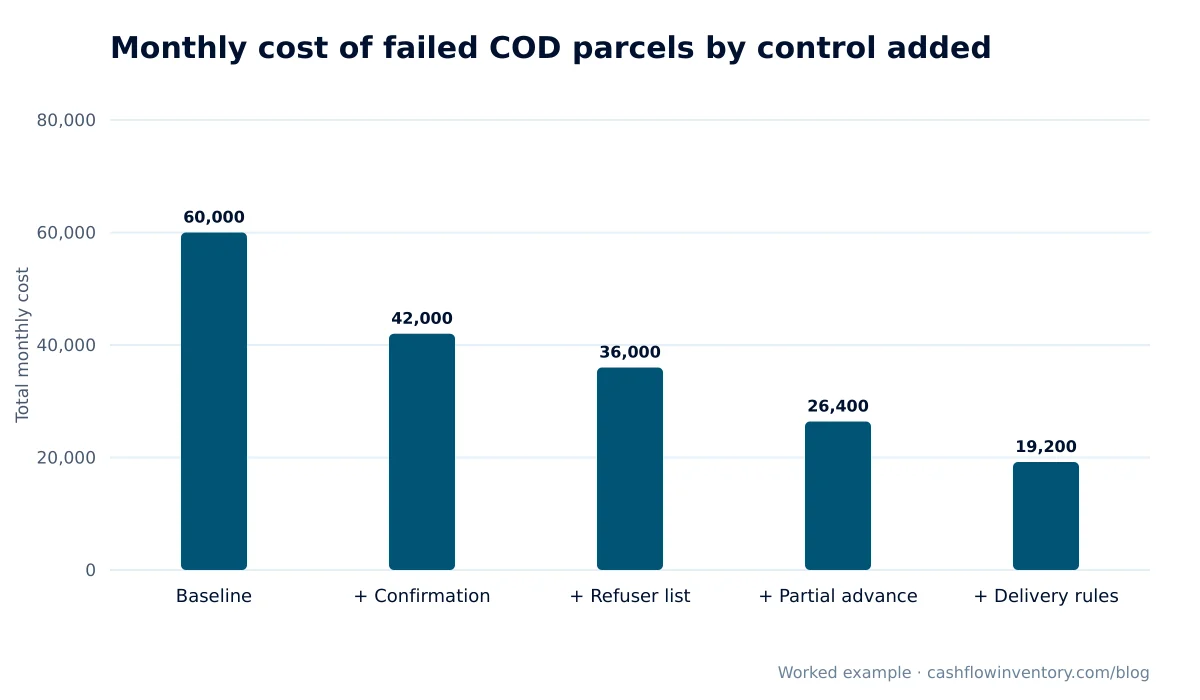
The pattern holds for most shops. Confirmation does the heavy lifting, and each later control trims what is left. Your own split will differ, so rebuild the table with your rate card and last month’s refusal count.
Checklist to reduce fake COD orders and returns
- Show the delivery charge at checkout, and offer free delivery only on prepaid orders or above a set basket value.
- Require a full address with area and landmark, and a phone number in the right format for your country.
- Send an automatic confirmation message within minutes of each order.
- Call every unconfirmed order within two to four hours, with two attempts at different times.
- Do not book a parcel until the order is confirmed. Cancel after a fixed time with no reply, for example 24 hours.
- Check the phone number, e-mail and address against your repeat-refuser list before booking.
- Ask for the delivery charge in advance on out-of-zone orders and on buyers with one past refusal.
- Ask for a partial advance on orders above your value threshold or with two or more risk signals.
- Pick and pack accurately, and dispatch within 24 hours of confirmation. Delays give buyers time to change their minds.
- Send a “shipped” message with the expected delivery day and tracking link.
- Record a reason code for every failed parcel: fake, refused, unreachable, wrong address, damaged, wrong item or late.
- Reconcile every returned parcel against the courier statement each week, and review your rules each month.
Confirmation message template
Hello {name}, thank you for your order {order number} from {shop}: {items}, total {amount}, cash on delivery to {area}. Please reply YES to confirm or NO to cancel. We will dispatch once you confirm. If we do not hear from you within 24 hours, the order will be cancelled.
Confirmation call script
- Greet the buyer by name and say which shop you are calling from.
- Read back the items, size or colour, total payable and delivery area.
- Ask: “Will you or someone at this address be available to pay on delivery in the next two to three days?”
- Confirm the landmark or a second contact number for the rider.
- If they hesitate, offer to cancel. A cancellation now costs you nothing.
- Log the outcome: confirmed, cancelled, no answer (attempt 1 or 2), or wrong number.
Messaging channels such as WhatsApp Business let buyers confirm with one reply, which costs much less staff time than calling.
Decision rules: confirm, ask for an advance or decline
| Signal on the order | Action |
|---|---|
| Returning buyer, no past refusals | Automatic message only. Ship on reply, or call if there is no reply. |
| First-time buyer, normal basket | Message, then call if there is no reply. Ship only once confirmed. |
| Basket above your value threshold | Confirm and ask for a partial advance (for example 20%). |
| Out-of-zone or remote address | Delivery charge paid in advance. |
| One past refusal with no reason | Delivery charge in advance before you ship. |
| Two or more past refusals | Full or partial prepayment, or decline politely. |
| Wrong number or invalid address | Cancel. Do not book. |
| Same buyer, several identical orders within minutes | Merge into one order and confirm by phone. |
A simple test for any new rule: a control is worth adding when failed parcels prevented × cost per failure is more than the control’s running cost plus the margin on genuine orders it loses.
Common mistakes when cutting COD refusals
- Confirming after booking. Once the courier has the parcel, a cancellation can still trigger a delivery or return charge. Confirm first, then book.
- Banning after one refusal. People get ill, travel or miss a rider. Ask for an advance instead, and keep bans for clear patterns.
- Blocking whole areas. You lose every good buyer there. Use prepaid delivery charges for difficult zones instead.
- No reason codes. If every failure is just “returned”, you cannot tell fake orders from slow dispatch, misshipments or rider problems.
- Counting COD sales as revenue at booking. Your ad reports will look better than your bank balance. Count a COD sale only once the cash is collected.
- Trusting the courier’s return count without checking. Match every parcel the courier says it returned against what actually arrived back on your shelf.
Edge cases generic advice skips
Rider marks the parcel refused without an attempt
If a buyer insists no one came, check the courier’s tracking history and raise it with the courier. A cluster of “refused” parcels from one rider or hub is a courier issue, not a buyer issue. Do not add those buyers to your refuser list.
Partial acceptance
A buyer may take one item out of three. Agree with your courier in advance how partial delivery is collected and returned. Record the accepted amount so your invoice matches what was actually paid. Partial acceptance is a returns process in itself, so handle it like your other returns management steps.
Gifts and orders for someone else
The recipient may know nothing about the parcel and refuse it. Ask at confirmation whether the order is a gift. For gifts, take a prepayment or a second contact number.
Sale periods and festivals
Order volume jumps, confirmation calls fall behind, and impulse orders rise. Increase automatic messaging, shorten the confirmation window, and raise the advance on high-value baskets for the duration of the sale.
Shared phone numbers
Families often share one number. Match refusers on phone plus name or address before applying a rule, so one relative’s refusal does not block the household.
Privacy rules for refuser lists
A refuser list is personal data. Keep only what you need, keep it accurate, and let people ask for it to be removed. If you sell to UK buyers, the Information Commissioner’s Office explains your duties. Other countries have similar laws.
How to do this in Cash Flow Inventory
Cash Flow Inventory covers the steps around the order: confirmation messages, refuser status on the customer, advances, and settling or returning each COD parcel once the courier reports it. Here is a procedure using the app’s own screens.
- Automate the confirmation message. In Settings › Messages, choose Connect & templates and connect your SMS or WhatsApp provider. Open Automatic and set the order saved message to Automatic (or Suggest, if you want someone to approve it). In Templates, write your confirmation wording and use Insert a placeholder… to add fields such as {{customer_name}} and {{doc_no}}. For WhatsApp, submit the template for approval and use Check Meta’s verdict. Order messages count as transactional, so no opt-in is needed. Check the Sent tab for delivery status.
- Approve orders only once confirmed or paid. Sales orders can be approved by hand, automatically, or by advance paid, and you can take deposits on them. See the sales orders guide. Orders from a connected store arrive as sales orders through the stores and marketplaces integration.
- Keep your repeat-refuser list on the customer. Store buyers are matched by e-mail, so each person has one record. Their Documents tab shows every order, invoice and return. For a repeat refuser, open More › Credit status… and choose On hold, with a note. New orders and direct invoices for that customer are then refused, with the status and note shown, until you change it.
- Take the advance. A delivery charge or partial advance paid by mobile wallet is held as a customer advance and applied when the invoice is made. The courier collects only the total less the advance, and revenue is still the full price.
- Hold COD invoices until the courier reports. In Settings › Sales › Approvals › Cash-on-delivery parcels, choose Hold the invoice until the courier reports the parcel. Choose whether parcels Delivered with the right amount settle by themselves or go to review, and whether to Record the courier’s delivery charge as a bill.
- Handle refusals. Booked parcels show in Sales › Invoices › Awaiting delivery. Anything that does not match goes to Approvals › Delivered parcels (COD), where you can mark it returned with a reason. That reason becomes your reason code.
- Reconcile. Open Integrations › the courier’s page › Reconcile parcels to see each parcel’s due, booked and collected amounts and the courier’s status. When the courier pays out, paste the statement into Accounting › Courier remittances and choose Post a settlement.
COD settlement works with couriers that collect the money, such as Steadfast, Pathao and RedX. The cash on delivery settlement guide covers the details. Courier set-up is explained in the Pathao courier integration guide and the Steadfast with WooCommerce guide. To see which ads bring real paying orders, ad attribution reports a cash-on-delivery sale only once it is paid.
Frequently asked questions
How do I stop fake cash on delivery orders?
Confirm every order by message or call before you book the parcel, and cancel orders that stay unconfirmed after a fixed time. Then add a repeat-refuser check and ask for an advance on risky orders. Confirmation alone removes most fake orders because there is no real buyer to answer.
Should I charge a delivery fee in advance for COD?
Charge it in advance where risk is higher: out-of-zone addresses, first-time buyers with large baskets, and anyone with a past refusal. Charging every buyer up front reduces conversions. If a parcel with a prepaid charge is refused, the advance covers your outbound cost.
Is it legal to keep a blacklist of customers who refuse COD?
In most countries you can keep records needed to run your business, but they count as personal data. Keep the list accurate and limited to what you need, and handle removal requests. Check your local data protection rules, especially if you sell to the UK or EU.
What is a normal COD return rate?
It varies widely by country, category, courier and price point, so compare against your own history rather than a general figure. Track the rate monthly by reason code. The trend tells you more than any benchmark.
Should I stop offering cash on delivery altogether?
In markets where many buyers prefer to pay at the door, dropping COD usually costs more sales than it saves. A better approach is to keep COD, confirm every order, and offer free delivery or a small discount for prepaid orders so buyers switch on their own.
How long should I wait for a confirmation reply?
Two to four hours before the first call, and around 24 hours before cancelling, works for most shops. Shorten it during sales so confirmed orders still go out within a day.
Fake and refused COD orders are a cost you can measure and reduce. Price one failed parcel, add the four controls in order, and record a reason for every return. To run confirmations, advances, refuser status and COD settlement in one place, start a free trial of Cash Flow Inventory.