Steadfast Courier With WooCommerce: Book Parcels, Track and Settle COD
Follow a WooCommerce order from checkout to a booked Steadfast parcel, through delivery, to the cash in your bank. Includes a worked COD payout example and a daily checklist.
On this page
- Key takeaways
- How the Steadfast and WooCommerce COD flow works
- The two formulas you need for COD with Steadfast
- Worked example: one day of Steadfast COD parcels
- Steps: from WooCommerce order to settled Steadfast payout
- Daily checklist for Steadfast COD orders
- Every morning
- Every afternoon
- On every payout day
- Common mistakes with Steadfast and WooCommerce COD
- Treating “delivered” as “paid”
- Booking in two places
- Changing the invoice after booking
- Ignoring return charges
- Editing stock in WordPress
- Edge cases the quick answers skip
- How to do this in Cash Flow Inventory
- Connect WooCommerce
- Connect Steadfast and set COD rules
- The daily procedure
- Frequently asked questions
- Does Steadfast Courier have a WooCommerce plugin?
- How do I know if Steadfast paid me for every delivered parcel?
- What happens to stock when a Steadfast parcel is returned?
- Should I record COD revenue when the order is placed or when it is delivered?
- Do I need to request a pickup from Steadfast every day?
To run Steadfast Courier with WooCommerce, bring each store order into a back office that books the Steadfast consignment with the right cash-on-delivery (COD) amount. That back office should then follow the parcel’s status by webhook and match what Steadfast collected against the invoice and the payout. The booking takes a few seconds. Most of the work goes into the reconciliation, because until Steadfast pays you, the cash sits with the courier and not with you.
This page follows one order the whole way: from checkout, to a booked parcel, to delivered, to money received. You get a worked example of a day’s parcels and the payout they should produce, a formula to check every Steadfast statement, and a daily checklist you can copy. You also get the edge cases that cause most COD losses, and the exact setup in Cash Flow Inventory.
Key takeaways
- The amount Steadfast collects should equal the invoice total minus any advance the customer already paid, such as a delivery charge sent by mobile wallet.
- A delivered COD parcel is money the courier owes you, not money in your bank. Keep it in a courier clearing balance until the payout arrives.
- Only parcels delivered with exactly the booked amount should settle without a person. Refusals, partial collections and changed invoices need a decision and a reason.
- Expected payout = cash collected on delivered parcels − courier charges deducted. Check this against every Steadfast statement before you post it.
- Steadfast collects booked parcels on its own round, so your daily work is booking, labelling, reviewing exceptions and matching payouts. You do not request pickups.
How the Steadfast and WooCommerce COD flow works
A WooCommerce store records the order and the payment method. It does not know whether the rider reached the customer, whether the customer refused, or what Steadfast deducted from your payout. Those facts live in the Steadfast merchant panel. The job is to connect the two sides so that every order has one parcel, one status and one settled amount.
The lifecycle has four money states, and you should be able to say which one every order is in:
- Ordered, not shipped. No money has moved. Stock is held for the order.
- Booked and in transit. The invoice exists and the parcel carries a COD amount. No cash yet.
- Delivered, cash with Steadfast. Revenue is earned, but the cash is a receivable from the courier.
- Paid out. Steadfast has transferred the net amount to your bank, after its charges.
Most COD leakage happens between the third and fourth states. A parcel marked delivered that never appears in a payout, a return charge you never noticed, or a partial collection booked as full payment: none of these show up on the WooCommerce order screen.
The two formulas you need for COD with Steadfast
The first formula sets the amount the rider collects. If the customer paid anything up front, the courier collects only the rest:
COD to collect = invoice total − advance already paid
Revenue is still the full invoice total. The advance and the COD collection are just two ways the same sale gets paid.
The second formula checks the payout. It does not matter how Steadfast labels its fees on the statement:
Expected payout = cash collected on delivered parcels − courier charges deducted
The parts are:
- Cash collected is the amount the courier reports for each delivered parcel. It may be less than booked if the customer paid part.
- Courier charges deducted are every delivery, return and COD-related charge on the statement, including charges for parcels that came back with no cash.
If the bank receipt differs from the expected payout, do not post it until you can name the parcel that explains the difference.
Worked example: one day of Steadfast COD parcels
Example: a shop selling cotton bedsheets and pillow covers through WooCommerce in Bangladesh (hypothetical). On one day it ships six parcels with Steadfast. All amounts are in taka. Courier charges are illustrative figures for this example, not Steadfast’s actual tariff.
| Order | Invoice total | Advance paid | COD booked | Courier status | Cash collected | Courier charge | What happens |
|---|---|---|---|---|---|---|---|
| #1001 | 2,450 | 0 | 2,450 | Delivered | 2,450 | 70 | Settles by itself |
| #1002 | 1,890 | 120 | 1,770 | Delivered | 1,770 | 120 | Settles by itself; advance applied |
| #1003 | 3,200 | 0 | 3,200 | Delivered | 2,900 | 70 | Review: collected less than booked |
| #1004 | 1,650 | 0 | 1,650 | Returned (refused) | 0 | 70 | Review: mark returned |
| #1005 | 2,750 | 0 | 2,750 | Delivered | 2,750 | 120 | Settles by itself |
| #1006 | 1,400 | 1,400 | 0 | Delivered | 0 | 70 | Paid in full; settles with no receipt |
| Total | 13,340 | 1,520 | 11,820 | 9,870 | 520 |
Check the totals:
- Invoice totals minus advances: 13,340 − 1,520 = 11,820, which equals the COD booked.
- Cash collected: 2,450 + 1,770 + 2,900 + 2,750 = 9,870.
- Courier charges: 70 + 120 + 70 + 70 + 120 + 70 = 520.
- Expected payout: 9,870 − 520 = 9,350.
Three parcels settle without anyone touching them, and one settles with no receipt because it was prepaid. Two need a person:
- #1003. The customer kept one pillow cover set and returned the other, so the rider collected 2,900. Someone must accept what was collected and handle the 300 difference as a return.
- #1004. The customer refused the parcel. The goods should come back to stock, and the 70 return charge is a cost of the failed delivery.
When the Steadfast statement shows a transfer of 9,350, it matches and can be posted. A transfer of 9,280 would point to a 70 charge you have not accounted for, so you would find it before posting.
Steps: from WooCommerce order to settled Steadfast payout
This is the procedure in order. The daily checks in the next section come from these steps.
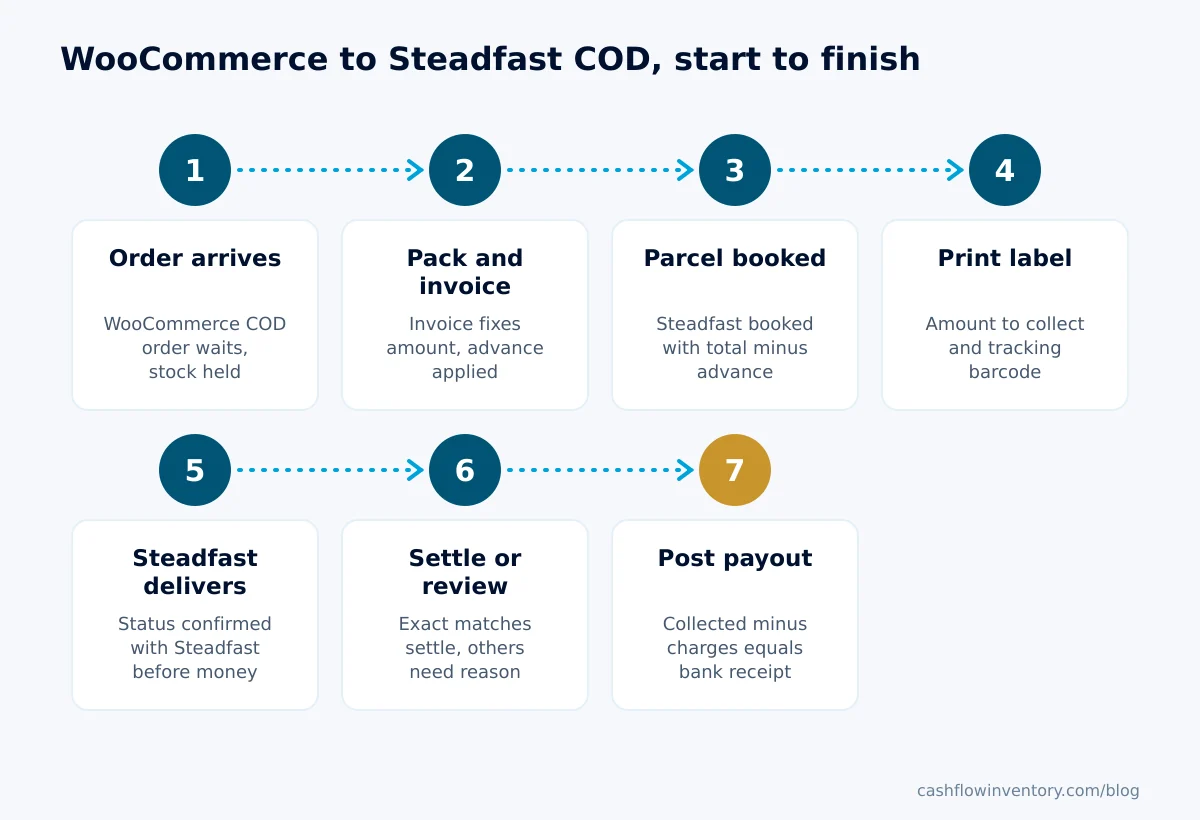
- Receive the order. The WooCommerce order arrives in the back office with the customer, shipping charge and payment state. A COD order waits with no money recorded. Its stock is held so the same units cannot be sold twice.
- Pick, pack and invoice. Pick against the order, pack it, and issue the invoice. The invoice fixes the amount owed. Any advance is applied at this point. A careful pick and pack process prevents most partial-acceptance disputes later.
- Book the Steadfast parcel. The consignment is created with the recipient details and the COD amount, which is the invoice total minus the advance. Book once and from one place only.
- Print the label and hand over. The label should show the amount to collect, or “PAID”, and the tracking number. Steadfast collects booked parcels on its own round.
- Track the status. Status updates arrive by webhook. “Delivered” should be confirmed against Steadfast’s own status before any money is recorded.
- Settle or review. Exact matches settle. Every other parcel gets a decision and a reason.
- Match the payout. Paste or compare the Steadfast statement, check it against the expected payout, and post the settlement to the bank.
Daily checklist for Steadfast COD orders
Ten to fifteen minutes a day is usually enough for a shop shipping a few dozen parcels. Run it at the same time each day, before the day’s parcels go out.
Every morning
- Store connection healthy: webhooks active, nothing waiting or failed.
- Yesterday’s WooCommerce orders all present as sales orders. Spot-check the count against WooCommerce.
- Every packed and invoiced COD order has a Steadfast tracking number. No order is booked twice.
- COD amount on each booking equals invoice total minus advance.
- Labels printed for today’s parcels, with the amount to collect visible on each.
Every afternoon
- Parcels in review: decide each one (approve as invoiced, accept what was collected, mark returned, or keep in review) and write the reason.
- Returned parcels: physically received and counted back into stock.
- Parcels in transit longer than your normal delivery window: chase them with Steadfast.
On every payout day
- Statement total = cash collected − charges deducted, parcel by parcel.
- Bank receipt equals the statement’s transfer amount.
- Any difference is named to a parcel before you post.
- Courier clearing balance goes down by exactly what was paid out plus charges.
Common mistakes with Steadfast and WooCommerce COD
Treating “delivered” as “paid”
If you record a receipt to the bank when the rider delivers, your bank balance on paper runs ahead of reality. Your ad numbers do too. Record delivered COD cash as owed by the courier and move it to the bank only when the payout lands. The same rule applies to marketing reports, which should count a cash-on-delivery sale only once it is paid.
Booking in two places
If one person books from the back office and another creates the consignment in the Steadfast panel, you get two consignments, two labels and confusing statements. Pick one booking route and stick to it.
Changing the invoice after booking
If you add an item or a discount after the parcel is booked, the rider collects the old amount. Cancel and rebook, or expect a review, because the invoice no longer asks the amount the courier collected.
Ignoring return charges
A refused parcel brings no cash, but it usually still costs a courier charge. It also ties up stock until it comes back. Track refusal rates per product and area as one of your retail KPIs.
Editing stock in WordPress
If you keep stock in a separate system, edits in WooCommerce drift away from it. Make one system the source of stock. Our guide on managing inventory in WooCommerce covers why.
Edge cases the quick answers skip
- Delivery charge paid in advance by mobile wallet. Hold it as a customer advance and apply it when the invoice is made. The COD booked is the rest. If you forget to subtract it, the customer is asked to pay twice.
- Order paid in full in advance. Book with zero to collect and print “PAID” on the label. The parcel settles with no receipt, because the money already came in.
- Half-taka amounts. Steadfast books whole units of currency, so a due of 1,234.50 is booked as 1,235. Your matching rule should treat that as the same amount, not as a 0.50 discrepancy.
- Rider marks delivered too early. Wait for the courier’s own confirmed status before money moves.
- Partial acceptance. The customer keeps some items and the rider collects less. Accept what was collected, then process the returned items so stock and revenue both correct.
- Order completed in WordPress but not shipped. Someone marks a WooCommerce order “completed” by habit. That should not skip picking, delivery or invoicing in your back office.
- Customer cancels after booking. Cancel the Steadfast consignment as well as the order. Otherwise a rider may still attempt delivery and a return charge may follow.
Expert tip: Keep a short list of standard review reasons, such as “customer kept part of order”, “refused at door” and “address not found”. Free-text reasons are hard to count. Standard ones tell you within a month which products and areas cause most failed COD deliveries.
How to do this in Cash Flow Inventory
Cash Flow Inventory runs the whole flow above. Steadfast and WooCommerce are both proven live, which means they run against real accounts with real orders. Here is the setup and the daily procedure, using the product’s own screens.
Connect WooCommerce
- In WordPress, open WooCommerce › Settings › Advanced › REST API › Add key, choose Read/Write and copy the consumer key and secret. WooCommerce explains these keys in its REST API documentation.
- In Cash Flow Inventory, open Integrations › WooCommerce › Connect and enter the store address and the two keys.
- On the WooCommerce page, open Webhooks and press Register all.
- Import the catalogue once from Integrations › Sync › Background imports & exports › Import, or link existing products with the products remapper.
- Check that the health view says Healthy.
Cash on delivery and unpaid store orders arrive as waiting, with no money recorded until it is collected. Store orders that took stock on the store hold those units here too. Full details are in the WooCommerce guide.
Connect Steadfast and set COD rules
- Under Integrations, in the Shipping & delivery group, connect Steadfast with the keys from your Steadfast merchant panel.
- Paste the webhook address and secret shown there into Steadfast’s portal, so status changes arrive within seconds.
- In Settings › Shipping, set shipping methods, zones and rate cards. Then choose How the carrier is chosen: people choose, suggest one and people confirm, or choose automatically.
- Give products a weight.
- In Settings › Sales › Approvals › Cash-on-delivery parcels, choose these options:
- Hold the invoice until the courier reports the parcel.
- Delivered with the right amount: approve, record the payment and settle by itself.
- Whether to Close the invoice once the cash settles it in full.
- Whether to Record the courier’s delivery charge as a bill, settled from the cash collected.
The daily procedure
- Open Sales › Ship & delivery and find the delivery. Use Compare shipping rates if you ship with more than one courier.
- Set Steadfast as the shipping method with Edit delivery…. The parcel is booked by itself once the goods are packed and the invoice exists, with the cash to collect taken from the invoice. The invoice then shows in Sales › Invoices › Awaiting delivery.
- Select the day’s deliveries and choose Shipping labels to print up to 200 at once, in the browser, as PDF, or as ZPL for Zebra printers. Each 100 × 150 mm label shows the amount to collect or “PAID”, and the tracking number as barcode and QR code.
- Skip Request pickup for Steadfast. Steadfast collects every booked parcel on its own round, so it is not asked.
- Let the status arrive. A rider’s “delivered” is checked with Steadfast’s own status before any money moves. The check runs when the Steadfast page or the review page opens, and every 15 minutes. Parcels delivered with exactly the booked amount, where the invoice still asks that amount, settle by themselves.
- Open Approvals › Delivered parcels (COD) and decide each parcel in review: approve as invoiced, accept what was collected, mark it returned, or keep it in review. Each decision needs a reason.
- Open Integrations › Steadfast’s page › Reconcile parcels. It shows every parcel: due, booked, collected, Steadfast’s status, your price against the courier’s charge, and where each one stands.
- When Steadfast pays out, open Accounting › Courier remittances, paste the payout statement, check the amount that should reach the bank, and choose Post a settlement.
Until the payout is posted, collected cash sits in Courier / COD Clearing as money Steadfast owes you, while revenue shows the full price. The couriers and shipping guide covers booking and labels. The cash on delivery settlement guide covers the approvals and remittances. Each connection’s status lives on its own integration workspace. To see the other stores and couriers that connect the same way, see ecommerce integrations.
Frequently asked questions
Does Steadfast Courier have a WooCommerce plugin?
Plugins come and go, so check the current options on Steadfast’s website. A booking plugin alone creates consignments but does not reconcile collected cash or payouts. If COD is most of your revenue, choose a setup that also matches each parcel to its invoice and to the payout.
How do I know if Steadfast paid me for every delivered parcel?
List every parcel marked delivered since the last payout, add up the cash collected, and subtract the charges on the statement. The result should equal the bank transfer. If it does not, compare parcel by parcel until you find the consignment that is missing or charged differently.
What happens to stock when a Steadfast parcel is returned?
The goods are not back on your shelf until the parcel physically arrives and is checked. Mark the parcel returned when Steadfast reports it, then count the items back in on arrival. Damaged items should go to a separate adjustment, not back into sellable stock.
Should I record COD revenue when the order is placed or when it is delivered?
The sale is earned when the goods are delivered and the invoice stands. The cash, however, is owed by the courier until it pays out. Record revenue at delivery against a courier clearing balance, then clear that balance with the payout.
Do I need to request a pickup from Steadfast every day?
No. Steadfast collects booked parcels on its own round, so booking the parcel is enough. Your job is to have the parcels packed and labelled when the rider arrives.
COD stays profitable when every parcel has one booking, one confirmed status and one matched payout, and when you check those every day rather than at month end. If you want the WooCommerce order, the Steadfast parcel and the settled cash in one place, start a free trial of Cash Flow Inventory and run tomorrow’s parcels through it.