Stock Transfers Between Shops and Warehouses: Process and Controls
Stock that moves between your shops and warehouses is where units quietly go missing. This guide gives you a six-step transfer SOP, a sign-off matrix, a worked example with a shortage and breakage, and decision rules for every kind of difference.
On this page
- Key takeaways
- What a controlled stock transfer process looks like
- Who signs what: the stock transfer sign-off matrix
- The stock transfer process step by step
- Copy-ready stock transfer checklist
- Worked example: a transfer with a shortage and breakage
- Handling transfer differences: decision rules
- Common stock transfer mistakes
- Edge cases that generic guides skip
- Month-end cut-off with goods on the road
- Stock that would go below zero
- Returns from shop to warehouse
- Serialised and high-value items
- Vans, market stalls and pop-up counters
- Cross-border transfers between branches
- How to do this in Cash Flow Inventory
- Set up once
- Run a transfer
- Differences, corrections and the books
- Frequently asked questions
- What is the stock transfer process?
- Who should approve a stock transfer?
- How do I record stock damaged during a transfer?
- Is stock in transit still counted as inventory?
- Should I use a transfer or an inventory adjustment to move stock?
- How long should goods stay in transit?
A good stock transfer process moves goods between your shops and warehouses in six controlled stages. A location requests stock, someone else approves it, the source picks it, the goods are dispatched into transit, the destination counts them in, and any difference is resolved and signed off. Each stage has its own document and is signed by a different person, so stock is never “somewhere on the van” with nobody accountable for it.
On this page you get a sign-off matrix showing who signs what at each step and a copy-ready SOP checklist. There is also a worked example with a shortage and breakage where every figure reconciles, and decision rules for short, damaged, extra and wrong items. The edge cases that generic answers skip are covered too, along with how to run the whole flow in Cash Flow Inventory.
Key takeaways
- Treat a transfer as four documents, not one: the transfer order, the pick, the delivery and the receipt. Each one has its own number and its own signature.
- The person who requests a transfer should not approve it, and the person who picks it should not receive it.
- Goods in transit are still your stock and still on your books. They are just at neither location, so they need their own place in your records.
- Count blind at the destination. Record what physically arrived, then deal with differences through a stock adjustment, not by editing the transfer.
- Check your in-transit list every week. A transfer left “sent but not received” is either a lost delivery or a receiving step that someone skipped.
What a controlled stock transfer process looks like
Transfers feel low-risk because the stock never leaves your business. That is exactly why they are badly controlled in many shops. Nobody is paying a supplier or chasing a customer, so nobody checks closely. Units go missing between the back door of the warehouse and the shelf of the shop, and the loss only shows up at the next count.
A controlled process breaks the movement into stages where responsibility changes hands:
- Request: the destination says what it needs and by when, usually based on its min and max stock levels.
- Approve: a manager confirms the move makes sense and reserves the stock at the source, so it cannot be sold twice.
- Pick: the source pulls the goods and records exactly what left, including lots and serial numbers.
- In transit: the goods are on their way. They are no longer at the source and not yet at the destination.
- Receive: the destination counts what arrived and accepts it into stock.
- Differences: anything short, damaged, extra or wrong is recorded, explained and approved.
The in-transit stage is the one most systems and spreadsheets get wrong. If you move stock with a minus at one shop and a plus at the other on the same day, the goods “teleport”. You lose the record of the journey, and any loss on the way disappears into a general adjustment. Our guide to transit inventory explains why that middle state matters for both stock and cash.
Who signs what: the stock transfer sign-off matrix
Controls come down to separation. One person should never be able to create a need, approve it, move the goods and confirm their arrival. The COSO internal control framework calls this segregation of duties. For a small business it simply means each step has a different name on it.
| Step | Document | Who does it | Who signs or checks | What the signature confirms |
|---|---|---|---|---|
| Request | Transfer order (draft) | Destination manager | Destination manager | Items, quantities, needed-by date and reason |
| Approve | Transfer order (approved) | Operations or area manager | Not the requester | The move is justified and stock is available at the source |
| Pick | Stock pick | Picker at the source | Second person checks the cartons | Quantities, lots, expiry dates and serials that physically left |
| Dispatch | Delivery | Dispatcher | Driver or courier signs for the cartons | Number of cartons, seal or tape reference, shipping method |
| Receive | Stock receipt | Receiver at the destination | Receiver signs, driver countersigns any visible damage | What was counted on arrival, carton condition |
| Differences | Stock adjustment | Destination manager | Operations manager or owner approves; bookkeeper reviews | Cause of the difference and its value |
In a two-person business you cannot fill every column with a different name. Keep the two separations that matter most. The requester does not approve, and the picker does not receive. If one person must do both, the owner reviews every difference personally.
The stock transfer process step by step
Use this as your SOP. It assumes a central warehouse refilling shops, but the same steps work shop to shop or shop back to warehouse.
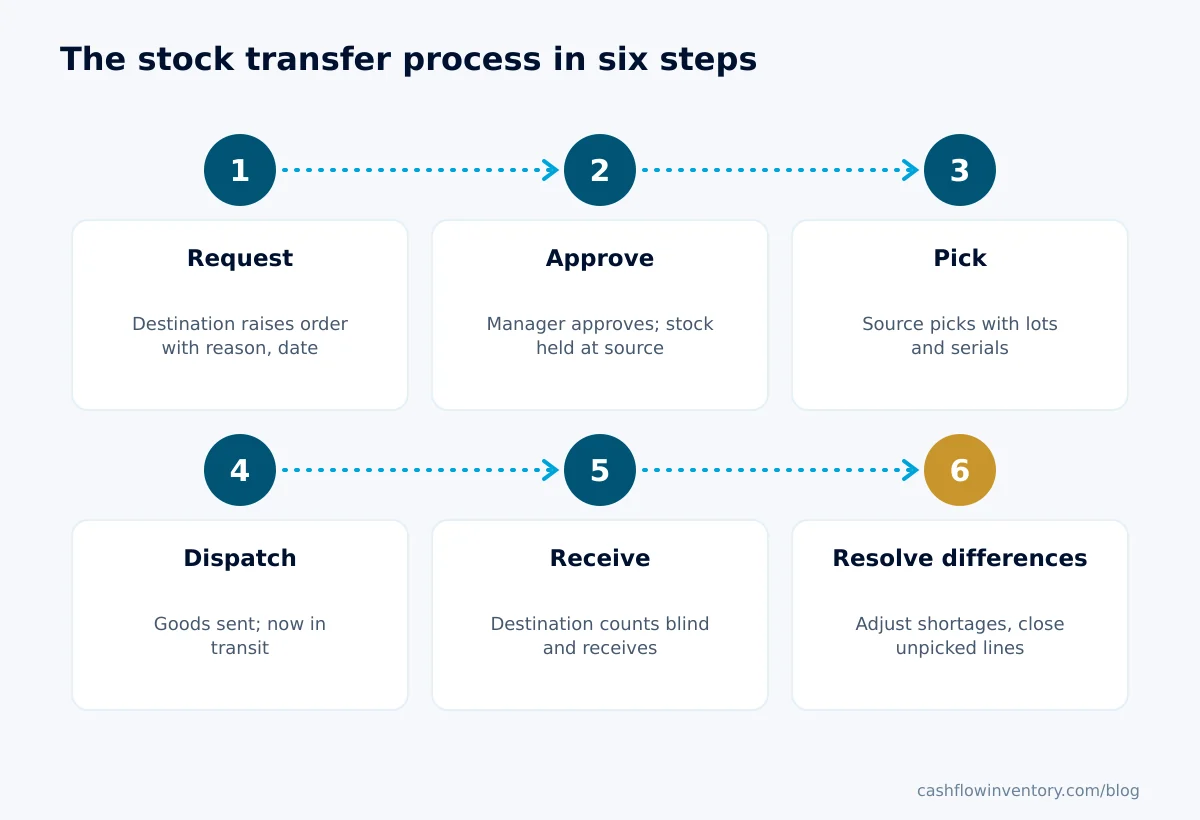
- Raise the request. The destination creates a transfer order with the source, destination, items, quantities and a needed-by date. It should also give a reason in the note, such as “below min”, “promotion” or “rebalancing slow stock”.
- Approve and reserve. A manager who did not raise it reviews the order and approves it. Approval should hold the stock at the source, so the warehouse cannot sell or send the same units elsewhere. Once approved, the order is locked, and changes mean cancelling and re-raising.
- Pick and check at the source. The picker works from the approved order, not from memory. They record the actual quantity picked and the lot or serial for every tracked item. A second person checks the cartons before they are sealed. The same discipline as your pick and pack process for customer orders applies here.
- Dispatch into transit. Record the delivery with its shipping method, number of cartons and any seal or tape reference. The driver signs for the cartons, not the contents. From this moment the goods are in transit.
- Receive and count blind. At the destination, the receiver counts what arrived without looking at the dispatched quantities first. They note carton condition before opening, then record the receipt. Our goods receiving SOP covers the counting technique in detail.
- Resolve differences. Compare counted with sent. Record any short or damaged units as a stock adjustment at the destination with a reason, attach photos, and get it approved. Close out any order lines that will never be picked.
Copy-ready stock transfer checklist
- Transfer order has source, destination, needed-by date and a reason in the note
- Approved by someone other than the requester
- Picked against the approved order, with lots, expiry dates and serials recorded
- Second person checked cartons before sealing; seal or tape reference written on the delivery
- Driver signed for the number of cartons
- Receiver noted carton condition before opening and photographed any damage
- Counted blind; receipt recorded the same day the goods arrived
- Every difference recorded as an adjustment with a reason and photos, approved by a manager
- Unpicked lines closed so the reserved stock is released at the source
- Weekly review of everything sent but not received for more than the normal journey time
Worked example: a transfer with a shortage and breakage
Example: a homeware business (hypothetical) with a central warehouse and two shops. Shop 2 requests a refill. The warehouse only has 48 of the 60 glass jars requested. Four mugs arrive broken. The ops manager decides the missing 12 jars will come on next week’s transfer rather than wait.
| Item | Unit cost | Requested | Picked and sent | Counted at Shop 2 | Difference | Value sent | Value of difference |
|---|---|---|---|---|---|---|---|
| Ceramic mug | 3.50 | 120 | 120 | 116 | −4 (broken) | 420.00 | 14.00 |
| Glass jar 1L | 5.00 | 60 | 48 | 48 | 0 | 240.00 | 0.00 |
| Chef knife (serialised) | 18.00 | 10 | 10 | 10 | 0 | 180.00 | 0.00 |
| Tea towel pack | 2.25 | 40 | 40 | 40 | 0 | 90.00 | 0.00 |
| Total | 230 | 218 | 214 | −4 | 930.00 | 14.00 |
Here is how it reconciles:
- Value requested: 420 + 300 + 180 + 90 = 990.00.
- Value never picked: 12 jars × 5.00 = 60.00. This is released at the warehouse when the order is closed.
- Value sent into transit: 990.00 − 60.00 = 930.00.
- Value that reached Shop 2’s shelves: 930.00 − 14.00 = 916.00.
- Value written off at Shop 2 as transit damage: 4 × 3.50 = 14.00.
Two checks keep every transfer honest. Run them on each one:
Value requested = value picked and sent + value released (never picked)
Value picked and sent = value received into stock + value of recorded differences
If either line does not balance, something moved without a document. Look at the inventory adjustments at both locations for the same dates. Someone may have “fixed” the count instead of recording the transfer.
On cost: IAS 2 Inventories includes in the cost of inventory the costs of bringing it to its present location and condition. Whether freight between your own sites belongs in stock cost or in expenses is a policy decision. Agree it with your accountant once and apply it the same way every time.
Handling transfer differences: decision rules
Differences are where most transfer losses hide. Use these rules so your team does not improvise:
- Short, cartons intact and seal unbroken: the error almost certainly happened at picking. Receive what was sent, record the shortage as an adjustment at the destination, and ask the source to recount the bin. Expect to find the units there.
- Short, carton opened or seal broken: treat it as possible loss in transit. Get the driver to countersign before they leave, photograph the carton, and escalate to the owner if it repeats on the same route or driver.
- Damaged on arrival: record the damaged units as an adjustment with the reason “transit damage”. Photograph them. If a courier carried the goods, the photos and signed note support a claim.
- Extra units arrived: do not quietly keep them. The source has a matching shortage. Record the extra at the destination, then check the source’s bin the same day so both sides are corrected together.
- Wrong item or wrong lot: record what actually arrived, then raise a return transfer for the wrong goods. Never relabel stock to match the paperwork.
- Source cannot fill the full quantity: pick what exists and send it. Then either leave the order open for a second pick or close it so the rest is released at the source.
Expert tip: set a value threshold for differences. Small breakage can be approved by the shop manager. Anything above the threshold, or any shortage with a broken seal, goes to the owner. That keeps approvals quick without hiding patterns.
Common stock transfer mistakes
- Moving stock with two adjustments. A minus at the warehouse and a plus at the shop leaves no transit record and no approval trail. Use transfer documents every time.
- Receiving on the driver’s word. “It’s all there” is not a count. If the receiver signs for contents they have not counted, the difference becomes nobody’s fault.
- Selling before receiving. The shop puts goods on the shelf and sells them before the receipt is recorded. Stock then looks negative or wrong at the destination.
- Editing the transfer to match the count. If you change “sent” to equal “received”, the loss vanishes from your records. Keep sent as sent and record the difference separately.
- Leaving transfers in transit for weeks. Goods sit in limbo, both locations reorder, and you tie up cash twice. Our article on the relationship between cash flow and inventory control shows why that hurts.
- Ignoring lots and expiry. If the pick does not record which lot left, a recall or expiry check at the shop becomes guesswork.
- Emergency transfers with no paperwork. “Just take a box over” is how most untraceable losses start. Raise the order afterwards the same day if you must, but raise it.
Edge cases that generic guides skip
Month-end cut-off with goods on the road
If you count both locations on the last day of the month, goods in transit are in neither count. They are still your stock. List open deliveries separately and add them to your stock valuation. If you run a cycle count schedule, avoid counting a bin that has an open pick against it.
Stock that would go below zero
If the source has sold units since the order was approved, a pick may try to take stock below zero. Rather than forcing it through, pick what is physically there and close the rest.
Returns from shop to warehouse
Slow sellers, end-of-season lines and faulty units going back to the warehouse are transfers too. Use the same documents in reverse, with the reason in the note, so returned stock is approved and counted like any other.
Serialised and high-value items
For phones, tools or anything with a serial number, the receiver should scan or check each serial, not just the quantity. A matching count with a swapped serial is still a loss.
Vans, market stalls and pop-up counters
If a van or event stand holds stock for days, set it up as its own location. Transfers out to it and back show exactly what sold and what came home.
Cross-border transfers between branches
Moving stock between your own branches in different countries usually still needs customs paperwork and may have tax effects. Check with your customs authority and accountant before the first shipment, and attach the paperwork to the transfer.
How to do this in Cash Flow Inventory
In Cash Flow Inventory, every stock figure, sale and purchase belongs to a location, which can be a warehouse, a shop or a counter. Transfers move stock between locations in four steps. Each step is a document with its own number, which maps directly onto the sign-off matrix above.
Set up once
- In Settings › General, set Several locations to Yes. The Transfers menu then appears.
- Add your warehouses and shops in Settings › Locations.
- Turn on Ask for the location at sign-in for people who work at several sites. You can also fix a person to one location.
- Give rights to match your matrix. Requesters get add and edit on transfer orders. Managers get approve, close, re-open and cancel. Pick, delivery and receipt rights go to the people who do each step.
Run a transfer
- Open Transfers › Transfer orders and choose New transfer. Choose From and To, which must be different locations.
- Enter the Date, and add Needed by, Handled by and a Note (your reason). Add the items and quantities, plus any costs such as freight.
- Save, then approve. The stock is held at the source and shown as expected at the destination.
- Open Transfers › Stock picking, choose Transfers to pick, and pick the lines with their lots and serials for tracked items.
- Open Transfers › Deliveries, choose Transfers to send, and send the pick on its way with its shipping method. The goods are now in transit. They are no longer at the source, not yet at the destination, and still on the books.
- At the destination, open Transfers › Stock received, choose Transfers to receive, and receive the delivery.
Differences, corrections and the books
A delivery carries the whole pick, and a receipt takes the whole delivery. If something arrived damaged or short, receive it and then record the loss with a stock adjustment at the destination. That is the same rule as the worked example above. Lots arrive with their original dates, and serials follow the units.
If the source could not fill everything, Close ends the order early and releases whatever was never picked. A closed order can be re-opened. A transfer order can be edited only while it waits for approval, and a waiting order can be cancelled.
Mistakes can be undone in reverse order. A pick can be deleted while it has no delivery and no bill. A delivery can be deleted while nothing has been received from it. A receipt can be deleted unless a lot or serial it brought in has already been used. Each delete reverses its stock movements and journal and puts the order’s progress back.
Billable cost lines such as freight or handling become supplier bills from the first pick, billed once, and each bill waits on the Bills page for approval. When stock is picked, its value moves into Tracking Transfers (stock in transit), so your bookkeeper can see exactly what is on the road.
For your weekly review, use the transfer order views: To approve, To pick, To send, To receive, Received, Closed and Cancelled. Anything sitting in To receive past its normal journey time needs a phone call. Every movement also appears in the stock movements log with who made it and the document. If a pick is blocked because stock would go negative, see how the stock never below zero policies work. The full walkthrough is in the locations and stock transfers guide.
Frequently asked questions
What is the stock transfer process?
It is the controlled movement of stock from one of your locations to another: request, approve, pick, dispatch, receive and resolve differences. Each stage has its own document and signature. Stock stays on your books throughout, shown as in transit while it travels.
Who should approve a stock transfer?
Someone other than the person who requested it, usually an operations or area manager. In a very small business the owner approves. The point is that no single person can both create the need and authorise the movement.
How do I record stock damaged during a transfer?
Receive the full delivery as sent, then record the damaged units as a stock adjustment at the destination with a reason and photos. Do not reduce the transfer quantity. That way the record shows the goods left the source and were lost in transit, which is what really happened.
Is stock in transit still counted as inventory?
Yes. Goods moving between your own locations remain your inventory and stay on your balance sheet. They simply sit in neither location’s count, so track them separately and include them in month-end valuation.
Should I use a transfer or an inventory adjustment to move stock?
Always a transfer. Adjustments are for correcting counts, damage and write-offs. Using them to move stock removes the approval, the in-transit record and the link between what left and what arrived.
How long should goods stay in transit?
No longer than the normal journey plus a day for receiving. For most local shop refills, that means received the same or next day. Review open deliveries weekly and chase anything older than your normal journey time.
Transfers are routine, which is why they deserve a routine that does not depend on anyone’s memory. If you want each step as its own numbered document with in-transit stock valued on the books, take a look at Cash Flow Inventory’s warehouse management software and run your next transfer through it.