Free Inventory Spreadsheet Template (Excel and Google Sheets) With Reorder Alerts
A free stock sheet for Excel and Google Sheets with reorder points, stock value and a reorder-now flag. Includes every formula, a worked example, a weekly routine and the signs you have outgrown it.
On this page
- Key takeaways
- What is in the inventory spreadsheet template
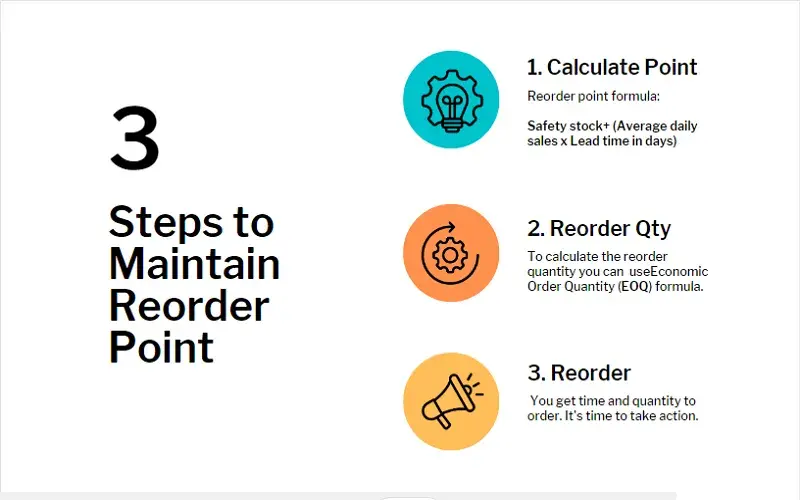
- The reorder point formula behind the “reorder now” flag
- Worked example: a shop selling tea and teaware
- How to set up and use your stock sheet
- Weekly stock sheet routine (copy this)
- Common inventory spreadsheet mistakes
- Edge cases the basic stock sheet does not handle
- Seasonal and slow items
- Sizes, colours and variants
- More than one location
- Batches and expiry dates
- Selling online and in store
- Signs you have outgrown your inventory spreadsheet
- How to do this in Cash Flow Inventory
- Frequently asked questions
- Is there a free inventory spreadsheet template for Google Sheets?
- How do I make Excel highlight items that need reordering?
- How often should I update an inventory spreadsheet?
- What safety stock should a small shop use?
- Can an inventory spreadsheet track more than one location?
- When should I switch from a spreadsheet to inventory software?
An inventory spreadsheet template is a stock sheet with one row per item. It records what you have on hand, what is on order and the reorder point, then calculates stock value and flags anything that needs ordering. Download the free Excel file below, which also opens in Google Sheets. Fill in your items, and the “REORDER NOW” flag tells you what to buy.
On this page you get the working file and every formula in it, explained column by column so you can rebuild it yourself. You also get a worked example from a small tea shop, a weekly routine you can copy, and the edge cases that catch spreadsheet users out. The last sections cover the signs that your business has outgrown a sheet, and what to move to when it does.
Free download: Inventory spreadsheet template with reorder alerts
An Excel file (.xlsx, 11 KB) with the formulas already in place and the example from this guide filled in. It opens in Excel, Google Sheets (File › Import), Numbers and LibreOffice. No sign-up needed.
Key takeaways
- The template flags an item when on hand plus on order is at or below its reorder point: average daily sales × lead time + safety stock.
- Include stock already on order, or the sheet will keep telling you to reorder things you have already bought.
- Round reorder points up, count in one base unit per item, and treat items with no recent sales separately.
- A spreadsheet only stays accurate if every receipt, sale and correction is entered. Count regularly and record the reason for each difference.
- Variants, several locations, batches and expiry dates, or more than one person editing at once are the usual signs you need software.
What is in the inventory spreadsheet template
The file has two sheets. Stock holds one row per item. Summary totals the stock value, counts how many items sit in each status and prices your suggested orders. You type into the plain columns, and the formula columns calculate themselves.
| Column | What it holds | Formula in row 2 |
|---|---|---|
| A SKU | Your item code | Typed |
| B Item | Name, including size or pack | Typed |
| C Supplier | Who you buy it from | Typed |
| D Unit cost | What one unit costs you, landed | Typed |
| E On hand | Units physically in stock | Typed |
| F On order | Units ordered but not yet received | Typed |
| G Avg daily sales | Units sold per day, averaged | Typed |
| H Lead time (days) | Days from placing an order to having stock on the shelf | Typed |
| I Safety stock | Buffer units for late deliveries or busy weeks | Typed |
| J Reorder point | The level that triggers an order | =ROUNDUP(G2*H2+I2,0) |
| K Max stock | The level you order back up to | Typed |
| L Stock value | On hand at cost | =D2*E2 |
| M Days of cover | How long current stock lasts at today’s sales rate | =IFERROR(ROUND(E2/G2,1),"") |
| N Suggested order | Units to order now | =IF(E2+F2<=J2,K2-E2-F2,0) |
| O Status | OUT OF STOCK, REORDER NOW, Watch or OK | =IF(E2<=0,"OUT OF STOCK",IF(E2+F2<=J2,"REORDER NOW",IF(E2+F2<=J2*1.25,"Watch","OK"))) |
“Watch” means the item is within 25% above its reorder point, so it will probably need ordering soon. If that warning arrives too early or too late for you, change the 1.25 in the Status formula. Every formula works the same in Excel and Google Sheets. If you want to go further with lookups, pivot tables and dashboards, our guide to Excel inventory management covers the next steps.
The reorder point formula behind the “reorder now” flag
The flag is only as good as the reorder point behind it. This is the formula the sheet uses:
Reorder point = average daily sales × lead time in days + safety stock
- Average daily sales: units sold over a recent normal period, divided by the days in it. A good default is the last 60 or 90 days. Leave out stock-out days if you can, because you sold nothing on those days only because you had nothing.
- Lead time: the real number of days from order to shelf. Include supplier processing, transit, customs and your own time to check and shelve the goods.
- Safety stock: the buffer that covers a slow delivery or a busy week. The safety stock calculator works it out from how much your demand and lead times vary.
The sheet compares the reorder point with on hand plus on order. That total is your stock position. When you raise a purchase order, enter the quantity in On order and the flag clears. When the goods arrive, move that number from On order into On hand.
For the reasoning behind each part, see our full guide to the reorder point formula and how to implement it. To check a single item quickly, use the reorder point calculator.
Worked example: a shop selling tea and teaware
Example: a shop selling loose-leaf tea and teaware (a hypothetical business). It stocks ten items. The owner counted on a Monday morning and filled in the sheet. Costs are shown in US dollars for illustration, but the template works in any currency.
| Item | Unit cost | On hand | On order | Avg daily sales | Lead time | Safety stock | Reorder point | Max | Stock value | Days of cover | Suggested order | Status |
|---|---|---|---|---|---|---|---|---|---|---|---|---|
| Assam breakfast 250g | 6.50 | 40 | 0 | 3 | 10 | 9 | 39 | 120 | 260.00 | 13.3 | 0 | Watch |
| Darjeeling first flush 100g | 11.00 | 12 | 0 | 1.5 | 14 | 6 | 27 | 60 | 132.00 | 8.0 | 48 | REORDER NOW |
| Kashmiri kahwa 100g | 7.20 | 55 | 0 | 1.2 | 12 | 5 | 20 | 60 | 396.00 | 45.8 | 0 | OK |
| Moroccan mint 100g | 5.80 | 18 | 0 | 2 | 7 | 4 | 18 | 50 | 104.40 | 9.0 | 32 | REORDER NOW |
| Chamomile 50g | 4.25 | 0 | 0 | 0.8 | 7 | 3 | 9 | 30 | 0.00 | 0.0 | 30 | OUT OF STOCK |
| Glass teapot 600ml | 14.00 | 9 | 16 | 0.4 | 21 | 3 | 12 | 25 | 126.00 | 22.5 | 0 | OK |
| Cast iron kettle | 32.00 | 6 | 0 | 0.1 | 30 | 2 | 5 | 10 | 192.00 | 60.0 | 0 | Watch |
| Steel infuser | 2.10 | 85 | 0 | 2.5 | 14 | 10 | 45 | 120 | 178.50 | 34.0 | 0 | OK |
| Tea tin 200g | 3.40 | 30 | 0 | 1 | 21 | 7 | 28 | 70 | 102.00 | 30.0 | 0 | Watch |
| Gift box sampler | 18.50 | 4 | 0 | 0 | 10 | 0 | 0 | 12 | 74.00 | 0 | OK |
How the Darjeeling row works. The reorder point is 1.5 × 14 + 6 = 27. The stock position is 12 on hand plus 0 on order, which is 12. Because 12 is at or below 27, the status is REORDER NOW. The suggested order is 60 − 12 − 0 = 48 units, which costs 48 × 11.00 = 528.00.
What the Summary sheet shows.
- Total stock value: 1,564.90.
- Statuses: 1 out of stock, 2 to reorder now, 3 to watch and 4 OK, which accounts for all 10 items.
- Suggested orders: 48 + 32 + 30 = 110 units, costing 528.00 + 185.60 + 127.50 = 841.10.
Three rows are worth a second look.
- Moroccan mint sits exactly on its reorder point of 18. The formula uses “at or below”, so it is flagged.
- Glass teapots have only 9 on hand against a reorder point of 12. The 16 already on order lift the stock position to 25, so the sheet does not ask you to order twice.
- The gift box has no recent sales, so its reorder point calculates to 0 and its days of cover is blank. That is correct for a seasonal item, but it needs a decision from you. The edge cases section explains how to handle it.
How to set up and use your stock sheet
- Download the file. In Google Sheets, upload it to Drive and open it with Sheets.
- Delete the example rows, but keep at least one formula row. To add more items, insert rows above the last item row so the Summary ranges stretch to include them.
- Do a full count before you enter on-hand figures. Last month’s numbers give you a sheet that is wrong from day one. Our guide to stock taking explains how to count without closing the shop for a day.
- Work out average daily sales from your sales records for each item, using the same period length for every item.
- Ask each supplier for their real lead time, then add your own receiving and shelving days.
- Set safety stock and max stock. Max stock should cover roughly one order cycle on top of the reorder point.
- Copy the formulas down columns J and L to O.
- Add conditional formatting so the Status column turns red for REORDER NOW and OUT OF STOCK.
Weekly stock sheet routine (copy this)
- Enter every delivery: add it to On hand and remove it from On order.
- Subtract sales since the last update, using the till or online store report.
- Record damaged, lost or expired items, with a reason noted beside each change.
- Filter Status for OUT OF STOCK and REORDER NOW, then raise purchase orders for the suggested quantities.
- Enter each new order in On order the same day you place it.
- Spot-count five to ten items and correct any differences.
- Once a month, refresh average daily sales and lead times.
- Once a quarter, look for items with more than 90 days of cover. That is cash sitting on a shelf.
Common inventory spreadsheet mistakes
Overwriting the on-hand number with no history. If you replace a figure and something is wrong next week, you cannot see why. Keep a simple dated log on a separate tab, or at least note the date and reason for every change. Our guide to inventory adjustments explains why a reason for each correction matters.
Forgetting stock on order. If you leave On order empty, the sheet will flag the same item every day until the goods arrive, and you can end up ordering twice.
Optimistic lead times. If a supplier quotes 7 days but deliveries usually take 12, use 12. An optimistic lead time sets the reorder point too low, and you run out while waiting.
Mixed units. If you buy tea tins in cartons of 24 but sell them singly, count everything in singles. A sheet that mixes cartons and units produces numbers that look right but are badly wrong.
Valuing at selling price. Stock value belongs at cost. Accounting standards such as IAS 2 Inventories measure stock at the lower of cost and net realisable value, never at retail price. Use landed cost, which includes freight and duties, in the Unit cost column.
Too much safety stock everywhere. A generous buffer on every item ties up cash. Spend your buffer on fast sellers and items with unreliable suppliers. Our article on just-in-time versus safety stock covers how to strike that balance.
Edge cases the basic stock sheet does not handle
Seasonal and slow items
When average daily sales are 0, the reorder point is 0 and the sheet never flags the item. For gift boxes, festival stock or anything ordered ahead of a season such as Ramadan, Diwali or Christmas, type a manual reorder point instead of the formula. Then add a calendar reminder for when to order. For very slow items, you may not want to restock automatically at all.
Sizes, colours and variants
Each size or colour needs its own row, because a reorder point only works for a single SKU. One T-shirt in five sizes and six colours becomes 30 rows. This is where sheets start to sprawl.
More than one location
A shop plus a storeroom, or two branches, means either one sheet per location or extra on-hand columns per location. In both cases the reorder logic has to decide which location’s stock counts. Errors multiply quickly.
Batches and expiry dates
Food, cosmetics and medicines need lot numbers and expiry dates. A single on-hand figure cannot tell you that 20 of your 50 units expire next month.
Selling online and in store
If the same stock sells on a website, a marketplace and a till, a sheet updated once a day will oversell. The online store keeps selling units the shop has already sold.
Signs you have outgrown your inventory spreadsheet
A spreadsheet is the right tool while one person owns it, the item list is short and stock sits in one place. Watch for these signals:
- Your counts regularly differ from the sheet and you cannot explain why.
- Two or more people edit it and overwrite each other’s changes.
- You sell the same stock in more than one channel and have oversold.
- You need variants, several locations, or batch and expiry tracking.
- Your accountant asks for stock value at a past date, and you cannot produce it.
- You spend more time keeping the sheet updated than acting on what it tells you.
- You want to know days of inventory on hand across the business, not just per item, without rebuilding formulas each month.
If three or more of these sound familiar, the sheet is costing you more than it saves.
Expert tip: Before you switch tools, clean the sheet. Make sure every SKU is unique, every unit is a base unit and every cost is landed. Whatever you move to next starts from this data, and clean data makes the move a short job.
How to do this in Cash Flow Inventory
In Cash Flow Inventory, stock is never typed into a product after it is set up. Every receipt, sale, transfer, production run, adjustment or count is a movement in one log. The figure you see is therefore always the sum of what really happened, which removes the main weakness of a spreadsheet.
- In Settings › Inventory, switch on what you need: Several units per product, Batch tracking, Serial numbers, and the Valuation method (weighted average or FIFO). Set up your locations in Settings › Locations.
- Open Inventory › Products and choose New product. Enter the Product name and Category, then choose the Type (Stocked, Not stocked or Service).
- Add the Unit, Brand and Supplier, then fill in Cost and Price. For sizes or colours, switch on Comes in options and edit each variant in the grid. Each variant carries its own price, cost, barcode and stock at every location.
- Under Stocked at, choose the locations, enter the opening stock from your last count, and choose Save product.
- Use the Restock tab of the products list as your “reorder now” view. It lists what is low or out, with what to reorder. From any row’s menu, choose New purchase order to order it.
- When a count finds a difference, open Inventory › Adjustments, choose New adjustment and pick Stock in or Stock out. Enter the Reason and the Person responsible. On approval, stock and the journal move together at cost.
The Items tab shows stock and value at cost for every product, so the totals on your Summary sheet are always there without any formulas. By default, no sale can take stock below zero, as explained in stock never below zero. The full setup is in the Products and inventory guide, and corrections are covered in the stock adjustments guide.
Frequently asked questions
Is there a free inventory spreadsheet template for Google Sheets?
Yes. The template on this page is an Excel file that opens in Google Sheets: upload it to Drive and open it with Sheets. Every formula uses functions that work the same in both, so the reorder flag and the totals carry over. See Google Docs Editors Help if you need help importing.
How do I make Excel highlight items that need reordering?
Select the Status column, then go to Home › Conditional Formatting › Highlight Cells Rules › Text that Contains. Enter REORDER NOW and choose a red fill, then add a second rule for OUT OF STOCK. In Google Sheets, use Format › Conditional formatting with “Text contains”. The Microsoft Excel support pages cover the options in detail.
How often should I update an inventory spreadsheet?
Enter deliveries and orders the day they happen, and enter sales at least weekly. For fast sellers, update daily. Spot-count a few items every week and do a full count at least once or twice a year. A sheet updated monthly will flag reorders too late.
What safety stock should a small shop use?
A practical starting point is a few days of average sales for reliable suppliers, and more for slow or unreliable ones. Then adjust: if you run out, raise it, and if stock never dips near the buffer, lower it. A safety stock calculator gives a more precise figure from how much your demand and lead times vary.
Can an inventory spreadsheet track more than one location?
It can, using a separate sheet or extra on-hand columns per location. However, transfers between locations then have to be entered twice, which is where most errors start. If you regularly move stock between sites, software that records transfers as single movements is safer.
When should I switch from a spreadsheet to inventory software?
Switch when more than one person edits the stock, when you sell in several channels, or when you need variants, locations or batch tracking. Repeated count differences you cannot explain are another trigger. Those are the points where a sheet stops being reliable, and they usually come before cost becomes the concern.
Free download: Inventory spreadsheet template with reorder alerts
An Excel file (.xlsx, 11 KB) with the formulas already in place and the example from this guide filled in. It opens in Excel, Google Sheets (File › Import), Numbers and LibreOffice. No sign-up needed.
Start with the template: count your stock, fill in the sheet and order what it flags this week. When the sheet starts to strain under variants, locations or several people editing it, start a free trial of Cash Flow Inventory. Every movement is logged and the Restock view keeps your reorder list up to date for you.