
Production work orders
Plan what to make, hold its materials, track it from planned to finished, and see the planned and actual cost of every work order.
What it is
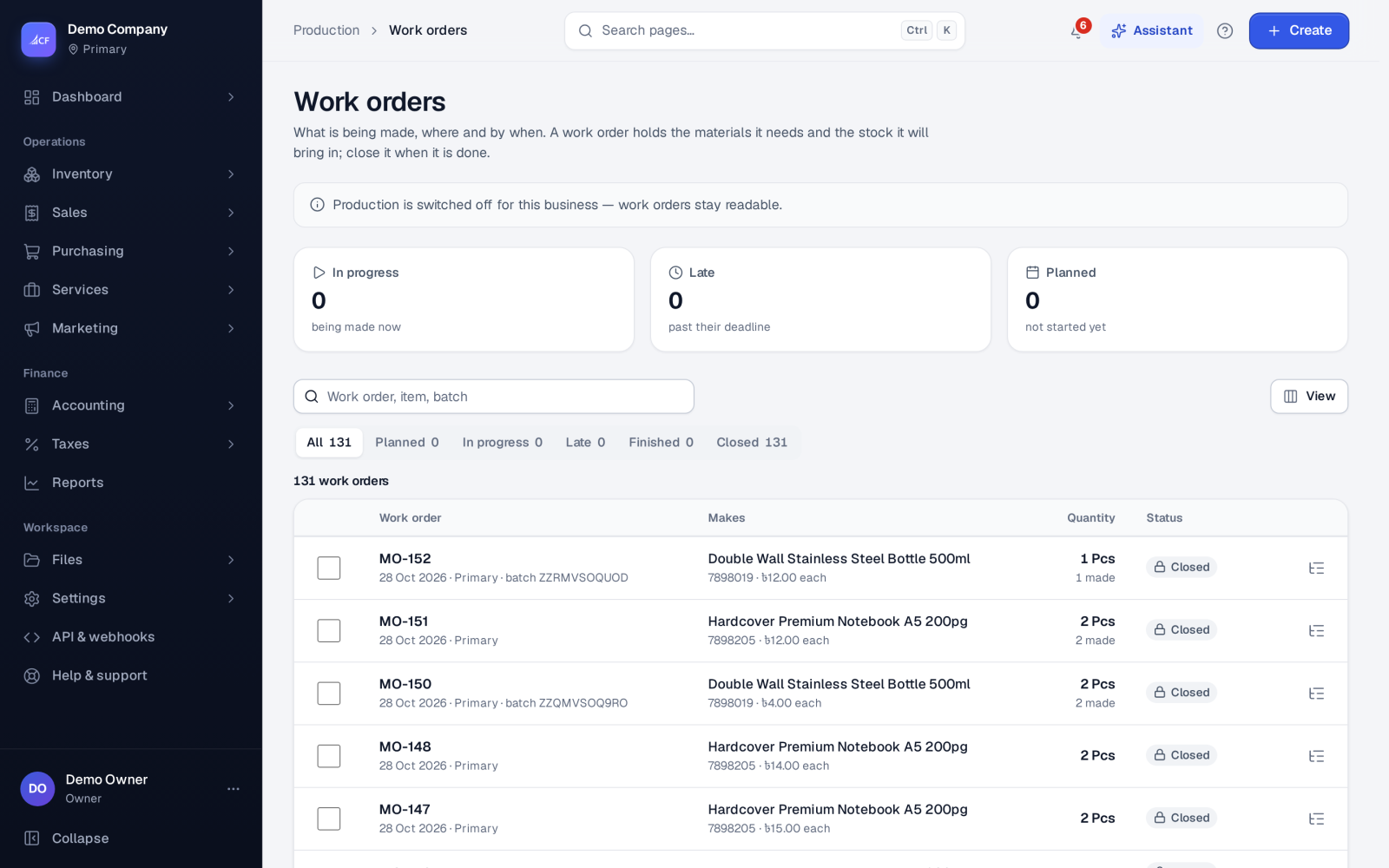
A work order (numbered MO-…) says: make this many of this item, at this location, by this date. It starts from the item's bill of materials, scaled to the quantity, and carries its own materials and operations.
When you save it, the materials are held for it and the goods it will make show as on order. It then moves through Planned → In progress → Finished, and is Closed at the end.
Who it is for
- Production managers planning and tracking jobs
- Supervisors starting and finishing work on the floor
- Storekeepers issuing materials
- Owners and bookkeepers comparing planned with actual cost
Before you start#
- Production must be on in Settings › General or Settings › Business setup.
- The item needs a bill of materials (or you add materials by hand).
- People need the work order rights: add to create, edit to start, finish, close and move cards on the schedule.
- Work orders have no approval step by default; the owner can add one in the work order workflow.
Step by step#
- Open Production › Work orders and choose New work order (or Make a work order on a BOM, or Make it on Demand plans).
- Choose the Item and enter How many.
- Choose where it is Made at, the Date, Finish by and, if it is for a customer, Needed by.
- For lot-tracked items, enter the Batch / lot no and Batch expires.
- Under How it runs, choose Simple — one step or Routed — step by step.
- Tick Take the materials out when the goods are received (backflush) if you do not want to issue materials separately.
- Check the materials and operations, and save.
- Issue the materials (unless it backflushes), start it, and mark it finished when the work is done.
- Receive the finished goods, then close the work order.
Other ways a work order is created#
- From an approved sales order with make-to-order lines: Create purchase / work orders makes a work order for each line that is made in-house and has a BOM (with Dropship & make to order on).
- From an accepted quotation.
- From Inventory › Replenishment for items refilled by making.
Statuses#
| Status | Meaning |
|---|---|
| Planned | Saved; materials held, goods expected |
| In progress | Started (or some operations done) |
| Finished | Work done; ready to receive the goods |
| Closed | Final; any remaining holds released |
The list has views for All, Planned, In progress, Late, Finished and Closed.
Rules
- Mark finished needs the materials issued first, unless the work order backflushes them on receipt.
- Once materials are issued or goods received, the quantity, location and materials are locked.
- Close… is final. Its holds on materials and on the goods it would make are released.
- There is no Cancel status. A work order can be deleted until anything has been issued, received, batched or invoiced from it; after that, close it instead.
Cost of a work order#
Cost per unit = (materials + operations) ÷ quantity, worked out by the app. The work order shows Time and cost, Operations, planned, Operations, actual (how many were recorded) and the Variance. Actual times come from the work sheet when Work-centre costing is on.
How it posts to the books#
Saving, starting, finishing and closing a work order post nothing. The postings happen on its documents:
- Material issues move cost from Inventory into Work in Progress.
- Finished goods receipts move it from Work in Progress back into Inventory, with the operations credited to Production Costs Applied.
- The receipt that completes the order sends any difference left in Work in Progress (actual against standard) to cost of goods sold.
Limits and what is not there yet#
- One level at a time: sub-assemblies need their own work orders.
- By default materials are issued once and goods received once per work order.
- By-products are received with a stock adjustment.
Questions#
Can I change the quantity after starting?
Only until materials are issued or goods received. After that, close the order and make a new one for the difference.
What does backflush mean?
The materials are taken out automatically when the finished goods are received, in proportion to what was received, instead of being issued beforehand.
How do I see late work orders?
Use the Late view on the list, or the Shop floor, which flags cards past their deadline.
Who can close a work order?
Anyone with the edit right on work orders, unless the owner's workflow limits it.